Open source use should come with oversight of the risks
Open-source software is widely used in business, but companies often lack visibility into their use of it, as was evident with a recent Log4j vulnerability. Experts recommend better management practices, including using software bills of materials and evaluating the health of open-source projects.
Open Source, has always been a point of contention when looking at the security aspect of software. In a commercial program/software the company has to know who it is employing and do security checks to ensure the safety of the software, however in a opensource package, we have no clue who the players are and if security checks are performed on any of the contributors.
It has been known that backdoors have been programmed into some of the open source software that is freely available, that has remained undetected for years.
Report: 99% of hospitals have vulnerable medical devices
Ninety-nine percent of 351 health systems in a study had internet-connected medical devices that were vulnerable to publicly available exploits, and 20% of hospital information systems had known vulnerabilities linked to ransomware exploitation, according to Claroty. The report recommends prioritizing security of devices with known exploited vulnerabilities that are directly connected to the internet or can be accessed remotely through a non-enterprise-grade method.
Microsoft InfoPath is now obsolte and Power Apps is the recomended Replacement.
Microsoft InfoPath a forms generator for SharePoint or desktop is being phased out and has been replaced by other Microsoft products such as SharePoint Lists, Flow, and PowerApps.
PowerApps, in particular, is highlighted as a superior replacement due to its ability to build new business applications quickly and efficiently. Microsoft announced the discontinuation of InfoPath on January 31, 2014, and PowerApps was introduced as the replacement in late 2016.
Power Apps is a suite of tools within the Microsoft Power Platform designed to help users create custom business applications without extensive coding knowledge. It includes services, connectors, and a data platform that enables rapid development of applications tailored to specific business needs.
Users can build various types of apps, such as canvas apps, model-driven apps, and cards, using Power Apps Studio, which provides a user-friendly interface similar to building a slide deck in Microsoft PowerPoint. These apps can be accessed from any device, including mobile phones and tablets, and can run offline, syncing data when a connection is re-established.
Power Apps integrates with other Microsoft services like Azure, Dynamics 365, and Teams, as well as third-party applications, allowing for seamless data connectivity and automation. It also supports custom code development and provides a low-code programming language called Power Fx, which can be used across the Power Platform.
Power Apps Studio supports a wide range of controls, including forms, buttons, date pickers, text inputs, rectangles, text boxes, and vertical galleries, among others. These controls help you create interactive and functional apps tailored to your business needs.
For those experiencing performance issues with Power Apps Studio, switching to Microsoft Edge as your browser is highly recommended, as it can significantly improve the performance and reduce lag.
Microsoft PowerApps Studio Desktop was deprecated in favor of the web studio experience. The web studio offers a more up-to-date and feature-rich environment for creating canvas apps, surpassing the capabilities of the desktop app in both features and performance. As of June 1, 2018 the desktop app’s authoring experience was deprecated.
Why IT pros need to prep for the quantum computing era
Quantum computing can offer unprecedented processing power but also break existing encryption methods. This development means there’s an urgency for data security professionals to prepare well in advance, since it’s predicted that the quantum computing market may reach $50 billion by the end of the decade.
New quantum computer computers are starting to flood the market, and I do believe that we may see these chips in mobile devices rolling out this year, and these devices will be able to connect to the Quantum Financial System (QFS). The new XPR network on the blockchain for everyone.
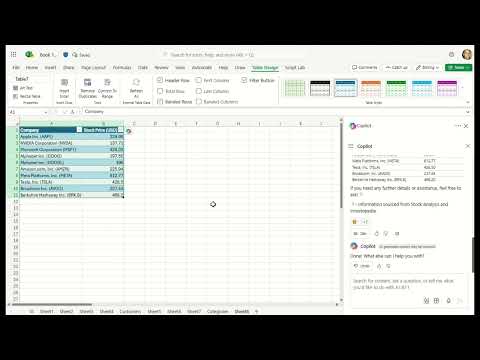
Copilot in Excel simplifies data analysis by enabling you to search for and import data from Word, PowerPoint, PDF documents, or other Excel files into your spreadsheets. Save time and gain insights with this powerful tool.
Search and import data with Copilot in Excel
Data analysis is a critical yet challenging task for many business professionals, as creating and preparing data, then gaining insights from it and conducting advanced analyses, can be time-consuming and complex.
Copilot in Excel can help! We’re thrilled to announce that Copilot in Excel can now reference Word, Excel, PowerPoint, and PDF files, making the entire data collection and analysis process faster, simpler, and more intuitive.
This new capability works for gathering information such as:
Web content: You can seamlessly search the web directly within Copilot in Excel to find public information like dates, statistics, and more without disrupting your workflow. For instance, you can look up a list of countries and their exchange rates, and easily paste these results into a table.
Internal content: For example, you can ask Copilot in Excel to list the announcements from a newsletter drafted in Word, and Copilot will respond with a list that you can insert into a new spreadsheet.
Organizational information: You can ask Copilot for all the employees who report to a specific manager and insert this list into a spreadsheet.
Data from another Excel file: One of our top user requests is toimport data from another Excel file. This is possible with Power Query, but doing so takes time and knowledge – not to mention, searching for the right file can be frustrating. Now you can ask Copilot for help finding and importing a table from an Excel file using everyday language. For example, say you want to add budget details from another Excel spreadsheet to your sales team table: You can describe the data that you need, and Copilot will help you import it. Because this import is powered by Power Query, it brings precise data directly from your organization’s data sources as a refreshable connection. As data is updated in the budget file, it also updates in your sales team table.
How it works
On the Home tab in Excel, select Copilot.
Ask Copilot a question about the data you are looking for.
Ask follow-up questions to Copilot’s responses until you’re happy with the results!
Video provider requires cookies to play the video. Accept to continue or watch it directly on the provider’s site.Accept
NOTE: For results that are from external data, make sure you see reference(s) at the end of the response.
Scenarios to try
Try prompting Copilot in Excel with:
“Search the web for an itinerary for a month-long trip to Europe in a table format.”
“Search the web for a list of 15 intermediate-level vocabulary words in Spanish and their translations.”
“Show me next week’s meetings and to-do items in a table.”
“List yesterday’s emails in a table, with sender, subject line, and importance.”
Known limitations
Importing refreshable data is only supported for Excel files with tables, stored on your SharePoint or OneDrive.
Addressing workbook data and asking for external data simultaneously is not fully supported yet.
Requirements
To use this feature, you must have:
a Copilot license (get more details on licenses for consumers and for businesses).
Paint now comes with new AI-powered tools to help you edit images like a pro and create art like a visionary. Included in the latest version of Windows 11, Paint is your new creative partner.
This is a huge update from the previous versions that was difficult to remove backgrounds, but working with layers was never possible. I am eager to try it and see how it works.
New features gradually being rolled out to the Beta Channel with toggle on*
Making sharing files in Windows easier
Sharing files in Windows is getting a lot easier and quicker with our new drag tray feature. When you start dragging a local file with mouse (or touch) from File Explorer or your desktop, a handy tray appears at the very top of your screen allowing you to drop the file into one of the displayed apps or choose “More…” to open the Windows share window.
Changes and Improvements gradually being rolled out to the Beta Channel with toggle on*
[Start menu] 2 Versions
Microsoft is introducing two new views to the “All” page in the Start menu: grid and category view. Grid and list view shows your apps in alphabetical order and category view groups all your apps into categories, ordered by usage. This change is gradually rolling out so you may not see it right away. We plan to begin rolling this out to Windows Insiders who are receiving updates based on Windows 11, version 24H2 in the Dev and Beta Channels soon.
The first step is to select the section you want your readers to arrive at when they click the page jump. To do this, we can create what is known as an “anchor” on the block you want to jump to.
Click on the block you want to add the anchor to. Many common blocks support anchors, including Paragraph, Heading, Image, Columns, and Buttons.
View the block’s settings in the right sidebar. If you do not see the sidebar on the right, click the Settings icon in the top right corner to bring up the settings. This icon looks like a square with two uneven columns:
The settings icon in the top right corner
At the bottom of the block settings, click on Advanced.
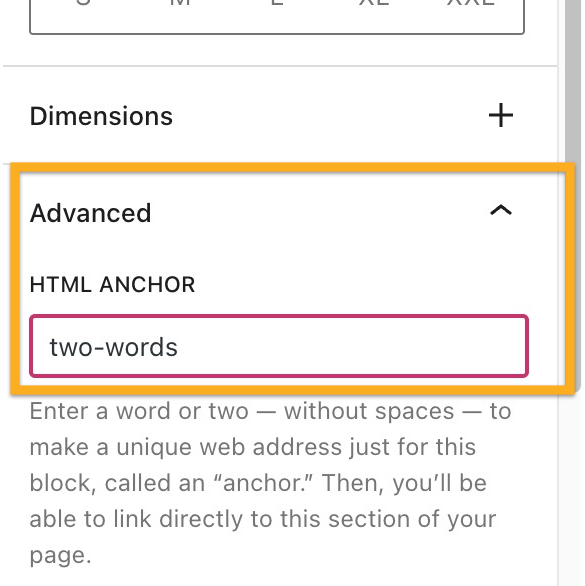
Type a word in the HTML Anchor box. This will become your anchor. Be sure to use a unique word that isn’t already being used as an anchor somewhere else on the page. If you want to use more than one word, it will automatically insert a hyphen (-) between the words, like this: two-words:
Step 2: Link to Your Anchor
Next, we’re going to create the page jump link itself. Your visitors will click on this to arrive at the section you created in step 1.
Type some text, or add an image, button, or navigation menu item for your readers to click.
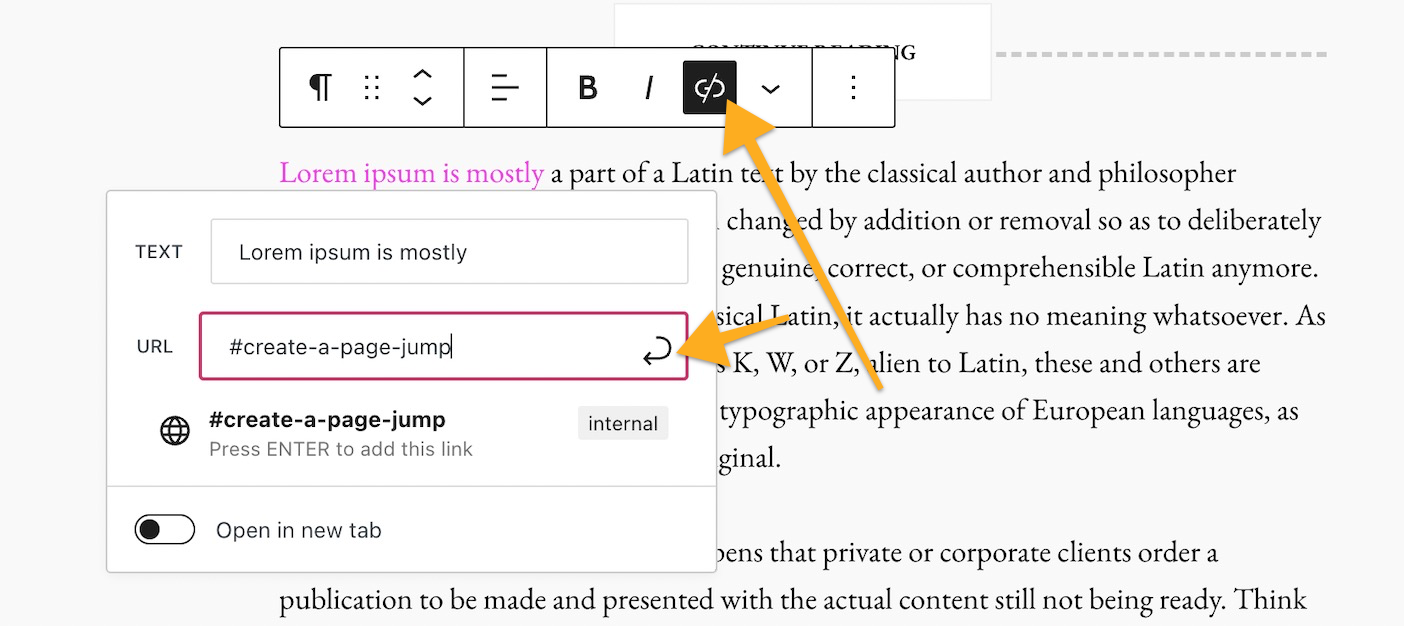
Select the text/image/button/menu item and click the link option in the block’s toolbar. The link option is an icon that looks like the actual link of a chain, as highlighted here:
Type in the HTML Anchor you created in Step 1, starting with the hashtag (#) symbol. For example, if you created an anchor named create-a-page-jump you would type your link as #create-a-page-jump
Click Save/Update/Publish in the upper right corner of the editor to save your changes.
That’s it! You can now test your link on the public page to make sure the link you created in Step 2 leads you to the anchor you created in Step 1. Note that the page jump links will not work when you preview a page or post, so test on the published version.
Page Jumps in a Navigation Menu
You can create page jumps from your navigation menu that link to a specific part of a page. This is common for sites that have a long scrolling homepage. Page jumps make it easier for visitors to view the section of the homepage they want.
The first step is to create an anchor as the spot to jump to.
In your menu, add a new item that’s a Custom Link.
In the Text field, write whatever you would like the menu item to be called. This will not affect the page jump.
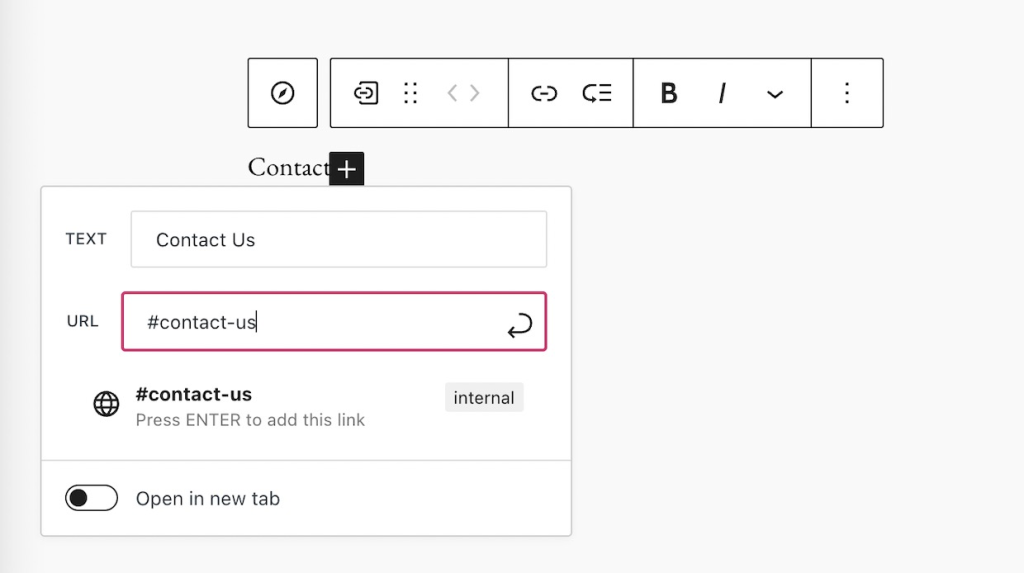
In the URL field, write your anchor with a hashtag (#) symbol in front of it as described above.
Adding a Page Jump in the menu
Keep in mind that a page jump like #my-anchor will only work on the same page that the anchor is on. If you wish to jump to a section of a different page, see the next section of this guide.
Jump to a Different Page
Page jumps don’t have to be used only for linking to sections within the same page. You can use a page jump to link from one page to a specific area on another page.
The difference is that instead of linking just to the anchor, like how we wrote our link as #create-a-page-jump in step 2 above, we would link to the full page URL plus the anchor.
For example, if your page has the following URL:
https://yourgroovydomain.com/example
and you create an anchor called unique-identifier on that page, then the full jump link would be:
Case study | Panasonic’s Strategic Adoption of the ITIL 4 Framework
Panasonic has been a leader in manufacturing excellence for decades. But as the digital era reshapes industries, Panasonic Connect is driving a bold shift—moving from product-focused operations to service-driven solutions. Dive into our case study to discover how ITIL 4 has empowered Panasonic to redefine its approach to service management.
For nearly a century, Panasonic has been synonymous with manufacturing excellence, pioneering technologies and products that have defined generations. However, the growth of service-oriented digital enterprises has necessitated a bold shift from its traditional manufacturing roots.
This initiative has been led by Panasonic Connect, which plays a central role in the growth of the Panasonic Group’s B2B solutions business and provides new value to its customers by working with them on the ground, facing their challenges alongside them. Panasonic partnered with HP Japan to offer flexible ITIL 4 modular training sessions through HPE Education Services.
When Panasonic Connect’s CEO announced a policy of shifting from manufacturing goods to providing services, the organization was operating a well-established manufacturing system, based on a waterfall-type, development-centered and vertically-divided organization with an emphasis on quality.
As the company shifted from “Monozukuri” (making goods) to “Kotozukuri” (providing services), there were many discussions about what needed to change in both the quality department and the management system to promote a service-focused business.
Company executives had commented that while other companies were solidifying their recurring business models, Panasonic was still maintaining the image of a 20th century manufacturer. They acknowledged that creating and selling goods is completely different from understanding customers’ management issues and proposing service solutions. This requires the ability to organize services but – at the time – Panasonic did not have significant experience with the delivery of recurring services.
Consequently, the company saw the need to make changes at both the management level and the “genba” (the frontline of operation).
This case study explores Panasonic’s strategic adoption of the ITIL 4 framework, highlighting the company’s innovative leap forward in aligning with contemporary service management best practices.
2. Challenges
PANASONIC FACED A MULTITUDE OF CHALLENGES IN ITS TRANSFORMATIVE JOURNEY:
CULTURAL SHIFT
Transitioning from a globally-renowned and well-established manufacturing mindset to a service and digital-focused culture required a change in processes and a significant shift in organizational thinking. This involved seeing differences in business models, job and quota allocation between selling and servicing, monetization and the need for agile development in a high-velocity environment. It became important to embrace a variety of knowledge and best practices to promote the service business.
KNOWLEDGE GAPS:
Despite its global presence, Panasonic recognized the need for a uniform understanding of service management. There was a crucial requirement to educate its workforce in ITIL 4 concepts across various geographies.
STRATEGIC IMPLEMENTATION
Integrating ITIL 4 into the existing Panasonic business model posed significant challenges, requiring a strategic approach to align the new framework with the company’s legacy systems and processes. This required organizations and employees with knowledge of ITIL best practice and an understanding of IT services, along with the ability to expand the use of high-velocity development mechanisms, infrastructure, and modern tools to design digital services.
“The ITIL framework sets a common goal between individuals, teams and the organization. It has been very meaningful for us to learn about the service value system in order to create value together.”
IN RESPONSE TO THESE CHALLENGES, PANASONIC UNDERTOOK A MULTI-FACETED APPROACH:
OBTAINING EXECUTIVE BUY-IN
The initiative began with gaining robust support from top-tier management, securing the necessary leadership endorsement to drive change. This included explaining to management the need for people who understand ITIL and service management practices. As a result, the CEO supported ITIL learning as part of continued employee development.
EMPLOYEE EDUCATION
Panasonic initiated training in ITIL 4 Foundation certification for its workforce, fostering a common language and a foundational understanding of service management practices.
COMMUNICATION STRATEGY
To ensure the ITIL 4 message resonated throughout the company, Panasonic developed a comprehensive communication plan. This included information cascades from senior leadership through the ranks, ensuring all employees understood the value and purpose of the change. For instance, using examples of service configuration and processes from other industries, such as banking, fostered discussions about how ITIL is a driver of service stability and value. This ensured that more people joined the circle of knowledge, generated interest in ITIL and started independent conversations about the framework.
MODULAR TRAINING
Panasonic partnered with HPE Education Services – Japan to offer flexible ITIL 4 training sessions. These were customized to cater to individual needs and schedules, ensuring maximum accessibility and uptake.
4. Results
CULTURAL CHANGE
Panasonic employees embracing continuous improvement and service management philosophies indicates a shifting organizational mindset. This means the company is both getting closer to customers and focusing on speed more than ever before.
In addition, there is now more agility in product development, therefore moving to market more quickly. Meanwhile, ITIL processes are creating greater agility in incident management. Customers are seeing a difference in delivery speed and Panasonic employees recognize the value in making these improvements.
ITIL 4 FOUNDATION UPTAKE
A notable milestone was reached with 2,000 employees obtaining their ITIL 4 certification, indicating successful initial adoption among the workforce.
ITIL 4 ADVANCED MODULES UPTAKE
The introduction of more advanced ITIL 4 courses in Japanese is anticipated to deepen the understanding and implementation of the framework.
As of now, 10 employees have attained the ITIL 4 Managing Professional designation and numerous others have completed advanced ITIL courses:
ITIL 4 Specialist: Create, Deliver and Support
ITIL 4 Strategist: Direct, Plan and Improve
ITIL 4 Specialist: Drive Stakeholder Value
ITIL 4 Specialist: High-velocity IT
ITIL 4 Leader: Digital and IT Strategy
ENGAGEMENT INDICATORS
Active participation in ITIL 4-dedicated channels on Microsoft Teams demonstrated a growing engagement and interest in service management concepts.
EMPLOYEE FEEDBACK
The training program was well-received, shown by a high Net Promoter Score of plus 15, with 40% of Panasonic respondents expressing strong support for the ITIL courses. Except for in-house training on management philosophy, the support rate for ITIL 4 training is among the highest at Panasonic.
CULTURAL CHANGE
Panasonic employees embracing continuous improvement and service management philosophies indicates a shifting organizational mindset. This means the company is both getting closer to customers and focusing on speed more than ever before.
In addition, there is now more agility in product development, therefore moving to market more quickly. Meanwhile, ITIL processes are creating greater agility in incident management. Customers are seeing a difference in delivery speed and Panasonic employees recognize the value in making these improvements.
ITIL 4 FOUNDATION UPTAKE
A notable milestone was reached with 2,000 employees obtaining their ITIL 4 certification, indicating successful initial adoption among the workforce.
ITIL 4 ADVANCED MODULES UPTAKE
The introduction of more advanced ITIL 4 courses in Japanese is anticipated to deepen the understanding and implementation of the framework.
As of now, 10 employees have attained the ITIL 4 Managing Professional designation and numerous others have completed advanced ITIL courses:
ITIL 4 Specialist: Create, Deliver and Support
ITIL 4 Strategist: Direct, Plan and Improve
ITIL 4 Specialist: Drive Stakeholder Value
ITIL 4 Specialist: High-velocity IT
ITIL 4 Leader: Digital and IT Strategy
ENGAGEMENT INDICATORS
Active participation in ITIL 4-dedicated channels on Microsoft Teams demonstrated a growing engagement and interest in service management concepts.
EMPLOYEE FEEDBACK
The training program was well-received, shown by a high Net Promoter Score of plus 15, with 40% of Panasonic respondents expressing strong support for the ITIL courses. Except for in-house training on management philosophy, the support rate for ITIL 4 training is among the highest at Panasonic.
5. Next Steps
SCALING EDUCATION:
Panasonic plans to increase the number of ITIL 4 Foundation-certified employees, with a focus on managerial staff to reinforce service management practices at the leadership level.
INTEGRATION OF PRACTICES:
Panasonic aims to align ITIL 4 practices more closely with its business operations, ensuring that value creation is consistently informed by service management best practices.
CONTINUOUS IMPROVEMENT:
Regular reviews of the adoption process are undertaken, allowing Panasonic to refine its approach based on feedback and performance insights.
Panasonic’s ITIL 4 adoption narrative is more than a step towards transformation. It is a testament to its commitment to remaining at the forefront of business innovation. One current example is an entry and exit system that uses facial recognition technology.
By embracing ITIL 4, Panasonic is not just adapting to the modern service economy but is actively shaping it, ensuring the company’s longevity and relevance in the rapidly-evolving global marketplace.
“We need to continue to create and provide value together with our customers. And where – in the past – there was pressure not to fail, I think that there is now psychological safety that says it is okay to fail.”
PeopleCert recently joined Amazon as a seller! This means that we can now instantly order our Official ITIL, PRINCE2 and other books—without purchasing a certification. Delving into these high-quality materials at your own pace before committing to a certification enables you to tailor your learning journey to your individual needs. We’ll be adding new stock to our store, so have a look at our books on Amazon today and spread the word! Browse PeopleCert books