On Nov. 6 Global Knowledge welcomes cybersecurity authorities from CompTIA, EC-Council and CQURE to a webinar on critical missteps that lead to breaches and proactive strategies to lower risk in the future. Speakers will break down what really happened in major cyber incidents and what every team can learn about prevention, response and resilience.
The Office of the National Cyber Director has begun developing a new strategy to address threats from China and other adversaries. The strategy will involve collaborating with the private sector, focusing on harmonizing regulations and setting minimum cybersecurity standards, said Director Sean Cairncross who has cited the need for a clear message to deter attacks. Full Story: Federal News Network/WFED-AM (Washington, D.C.) (10/31)
This new strategy may eventually be adopted on a Global scale, as we follow the goings on around the World.
Microsoft Word now autosaves new documents to the cloud
Microsoft is updating Word for Windows to automatically save new documents to the cloud, eliminating the need for users to enable AutoSave manually. While users can set default cloud locations or disable the feature, some have expressed frustration over the added steps to save files locally. Full Story: PCWorld (8/28)
In my opinion this is a really sad state of affairs, not giving people a choice, is an infringement of our rights.
Researchers from SquareX said they were able to compromise passkeys through browser #vulnerabilities. The researchers presented their findings at Def Con 33, showing attackers can use #malicious extensions or scripts to intercept passkey workflows, making fraudulent passkey prompts appear legitimate. But security experts have criticized the research, saying it demonstrates a misunderstanding of the FIDO specifications and security principles.
Need to open Task Manager? You can press CTRL + Shift + Esc to quickly open it whenever you want to monitor what’s going on with your system. Learn more keyboard shortcuts❯
Wish that system tray icon wasn’t hidden? Rather than going to Settings > Personalization > Taskbar to show or hide the icon, you can also just drag and drop it out of the hidden icons menu. Learn more taskbar options❯
Want to know the time, down to the exact second? In Settings > Time & Language > Date & Time,under Show time and date in the system tray, you can set seconds to show in the taskbar. We’re working on more options too❯
The new agent in Settings rolling out for AMD and Intel®-powered Copilot+ PCs An experience designed to help solve one of the most common frustrations: finding and changing settings on your PC. With this update to Settings, simply describe what you need help with, and the agent will recommend the right steps to address the issue. This experience started rolling out to Insiders with AMD and Intel®-powered Copilot+ PCs in the Dev Channel and Beta Channel with their primary display language set to English. Discover the new agent in Settings
New describe image action in Click to Do The new “describe image” action in Click to Do gives detailed descriptions of images, charts and graphs on Copilot+ PCs. Designed to improve accessibility, it can be used by everyone in scenarios like getting a quick overview of a graph or a chart, generating alt text, and more. This feature is rolling out to Insiders in the Dev Channel and Beta Channel. Learn more about the new describe image action in Click to Do
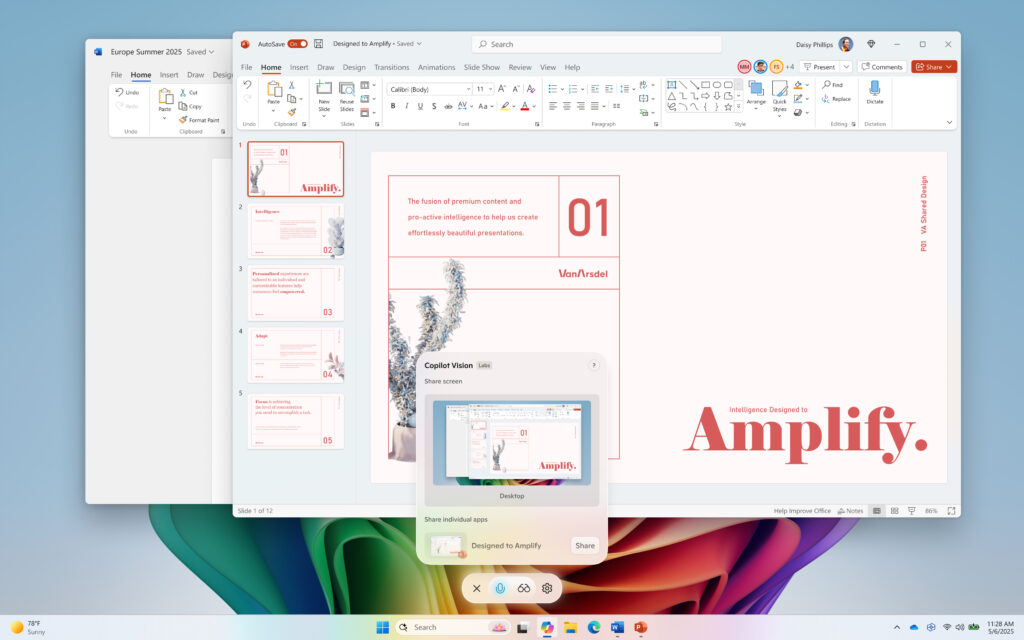
Vision Desktop Share begins rolling out to Windows Insiders
Share your whole desktop with Copilot and show it what you see! Copilot can then help analyze content, provide insights, and answer your questions in real time. Vision Desktop Share is beginning to roll out across all Insider channels via the Microsoft Store in markets where Windows Vision is enabled. Stay tuned as these features are gradually rolling out!
The new PeopleCert Plus exclusive addresses an important gap in the digital transformation journey: how to effectively use ITIL® to navigate and lead transformative change. While many organizations recognize the value of ITIL in managing IT services, few resources have bridged the theory with practical guidance for real-world transformation initiatives. PeopleCert now have the “ITIL How to Implement Official Book” that offers clear, actionable insights into aligning ITIL practices with strategic change, enabling leaders to harness ITIL not just as an operational tool, but as a catalyst for enterprise-wide value creation. By doing so, it fulfils an urgent need for structured, adaptable guidance in an era where transformation is constant and complexity is the norm.
ITIL How to Implement includes:
· A transformation model: four layers, twelve stages, and twenty-four steps.
Three types of patterns: initiation patterns, governance patterns, and execution patterns.
A toolbox: description of twenty six methods and tools supporting various transformation activities.
The guidance in this book is flexible, structured, scalable, innovative, and supported by proven concepts, methods, and tools. ITIL How to Implement addresses the volatile, uncertain, complex, and ambiguous nature of today’s business and technology environments and helps organizations to find the balance between manageability and flexibility.
The transformation model
The transformation model offered by this guidance includes layers, stages, and steps. The layers apply to any transformation; the stages and steps vary depending on the selected execution pattern.
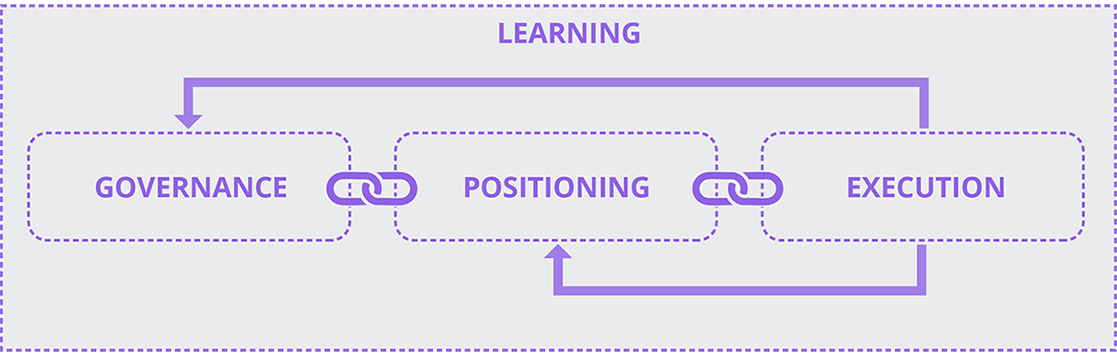
Figure 3.1 The four layers of the transformation model
The four layers are governance, positioning, execution, and learning.
Governance: direction and boundaries are established while allowing for flexibility. Effective governance creates alignment between transformation and organizational strategy, ensuring efforts deliver meaningful value while preventing excessive control.
Positioning: the best-fitting approach for each situation is determined through contextual assessment. Through positioning, applying standardized methods to diverse contexts is avoided by matching approaches to the actual nature of each challenge.
Execution: changes are carried out using methods matched to context–whether ordered, complex, or chaotic. Through execution, opportunities are transformed into real-world actions through appropriate activities and techniques based on contextual understanding rather than habit.
Learning: insights are captured to improve current work and build future capability. Mechanisms are created to gather information, extract meaning, and apply understanding in ways that enhance transformation effectiveness over time.
The patterns
The guidance describes three types of patterns:
Execution patterns: describe how the execution of initiatives and activities within a transformation varies depending on the complexity of the context; this guidance covers ordered, highly predictable contexts, complex environments where traditional approaches designed for ordered contexts are not effective, and unpredictable contexts when an urgent need (e.g. a significant external event) requires the organization to transform in order to move from a chaotic to a manageable state.
Initiation patterns: describe common triggers of transformations at the organization and SVS level, and explain their impact on the transformation layers, stages, and steps so that the approach to change is clear and consistent.
Governance patterns: help organizations to understand their established approach to governance, as well as identify and adopt the optimal approach to the governance of a particular transformation. When the established BAU governance pattern is not suitable, the ITIL How to Implement Official Book helps to bridge the gap and maintain effective oversight throughout the transformation.
Methods and tools
The How to Implement Official Book includes twenty six methods and tools that may be used at different stages of the transformation model. Descriptions of the transformation model stages, steps, and patterns include references to the relevant methods and tools.
What is in it for you?
This Official Book has four key target audiences:
Sponsors and owners of transformation initiatives: Sponsors or owners are accountable for setting the direction, securing support, and ensuring successful outcomes from the transformation. This guide provides a flexible model to align transformation goals, enable effective governance, empower teams, monitor progress, and utilize the right tools for lasting success.
People involved in carrying out the transformation work: This guide provides managers and teams with a practical, step-by-step approach to manage transformation by defining and adapting activities across governance, positioning, execution, and learning layers. It helps apply the right execution pattern while aligning work with transformation goals using initiation patterns. The guide also offers a toolbox of methods and tools to support each step and encourages professional development focused on relevant practices.
People affected by the transformation: This guide helps those involved in organizational transformation understand what to expect and how to participate. It explains how transformations are planned and executed through a flexible model that considers stakeholder needs, clarifies how governance patterns affect decision-making and opportunities for involvement, highlights how execution patterns influence the pace and style of change, and provides insights to support professional growth and career development.
Consultants supporting transformation initiatives: Consultants bring external expertise to help organizations navigate transformations by diagnosing needs with initiation patterns, recommending appropriate governance models, coaching on tailored execution patterns, guiding the application of the transformation model with suitable tools and facilitation, and introducing proven methods for engagement, analysis, planning, and evaluation.
A new Windows 11 feature called Quick Machine Recovery is designed to restore PCs quickly after boot failures. On a failed boot, QMR initiates a step-by-step process that diagnoses the issue, connects to Windows Update, searches for solutions and applies fixes. In test scenarios, the process took under four minutes. QMR is still rolling out and works best on newer devices, but it aims to dramatically reduce recovery time for users and businesses alike.