So you have a terrific online store, and you want it to flourish. One way to increase sales is by driving organic traffic to your site. It’s an effective method for attracting customers without having to spend money on ads. This is why many sites are using SEO to draw customers in, according to Search Engine Journal. Wondering how you can get started? Here are four eCommerce website SEO tips that can help grow your bottom line.
1. Make your site easy to understand and use
First off, make sure your site structure is clear, mobile-optimized, and fairly intuitive. It should be easy for visitors on a variety of devices to understand how to use your site and find what they are looking for. Customers must be able to easily search for and locate the products they want. Using the shopping cart and checking out should be a snap, as well. If visitors find your site accessible and helpful, then search engines will, too — and they’ll boost your search engine ranking, sending more organic traffic your way.
2. Choose relevant keywords
Relevant keywords are essential for your site, particularly if you have an eCommerce blog. You can get started with keyword research using a tool such as WordPress SEO by Yoast, SEMRush, or Google Keyword Planner. First, determine the top two keywords you want to rank on. These should be search terms that your target audience might use when searching for your site. They may be competitive, but you should be able to increase your ranking over time by including them on relevant parts of your site, such as meta descriptions, product pages, blog posts, permalinks, and image names. Consider also including less popular, long-tail keywords that will help customers find you. Once you’ve done this, periodically check the keyword ranking for your site to keep track of how you’re doing.
3. Optimize product images
Images frequently appear in Google search results, presenting you with a golden opportunity to get your products noticed. To do so, optimize your product images and primary category images for SEO. In most cases, especially where product photos are concerned, you’ll want to use a high-quality JPEG image. But make sure that the file size isn’t so large that it’s slow to load. Otherwise, customers may decide to move on and leave the site. If the size of the image file you want to use is too large — say, over 2 MB — you can re-size it with image-editing software.
4. Write great product descriptions
Each product in your store should have a brief, well-written product description that is optimized for SEO. It’s important to include relevant keywords in your product descriptions, but only if they fit naturally. Search engines often penalize sites they think are engaging in keyword stuffing — that is, forcing a particular webpage full of keywords in an attempt to game search engine rankings. Although you can use the manufacturer’s product description, writing your own product description usually produces better results.
With these four eCommerce website SEO tips, you can begin driving more organic traffic to your online store. If you have a WordPress.com Business or eCommerce plan and want to optimize your eCommerce site’s SEO even more, you can explore WordPress.com SEO tools or take a free online course on WordPress.com Business SEO.
A simple extension of a brilliant hack by Lucas (@Whistler4Ever), published by Sergey Tkachenko at WinAero,
and unearthed by Steven Parker at Neowin gives
you a very easy way to put an icon on your Windows 10 Desktop screen that opens
to just about any Settings page, where you can change a setting in a nonce.
Right-click or tap and hold any blank place on the Windows 10
Desktop.
Choose New > Shortcut.
Pick one of the ms-settings apps listed below and type it into the
input box. For example, to go to the Data Usage app, type ms-settings:datausage in the box marked
Type the location of the item.
Click Next, give the shortcut a name, and click Finish.
A new shortcut appears on your desktop. Double-click or tap it, and the Settings app appears.
Spear phishing campaigns —they’re sharper than you think
Diana Kelley
Cybersecurity Field CTO
Seema Kathuria
Senior Manager, Cybersecurity Solutions Group
Even your most security-savvy users may have difficulty identifying honed spear phishing campaigns. Unlike traditional phishing campaigns that are blasted to a large email list in hopes that just one person will bite, advanced spear phishing campaigns are highly targeted and personal. They are so targeted, in fact, that we sometimes refer to them as “laser” phishing. And because these attacks are so focused, even tech-savvy executives and other senior managers have been duped into handing over money and sensitive files by a well-targeted email. That’s how good they are.
Even though spear phishing campaigns can be highly effective, they aren’t foolproof. If you understand how they work, you can put measures in place to reduce their power. Today, we provide an overview of how these campaigns work and steps you can take to better protect your organization and users.
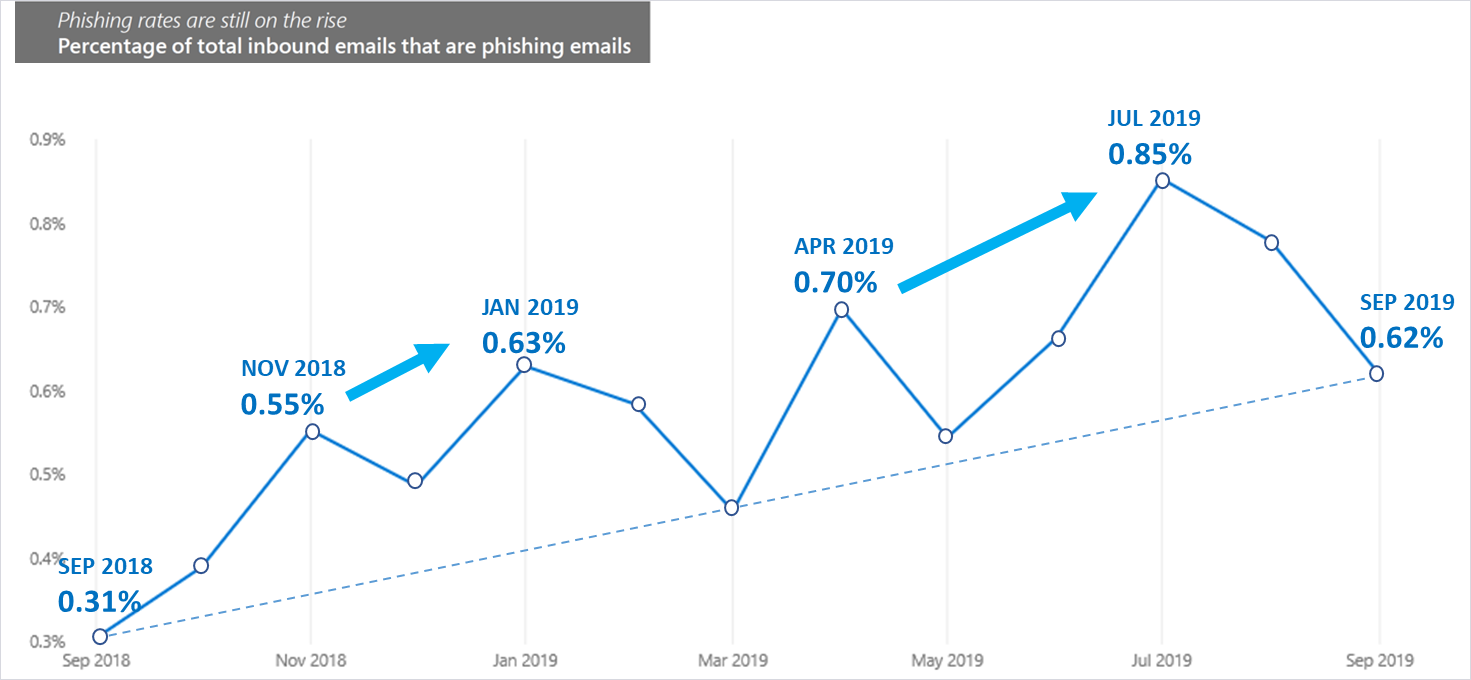
Figure 1. Percentage of inbound emails associated with phishing on average increased in the past year, according to Microsoft security research (source: Microsoft Security Intelligence Report).
Step 1: Select the victims
To illustrate how clever some of these campaigns are, imagine a busy recruiter who is responsible for filling several IT positions. The IT director is under a deadline and desperate for good candidates. The recruiter posts the open roles on their social networks asking people to refer leads. A few days later they receive an email from a prospective candidate who describes the role in the email. The recruiter opens the attached resume and inadvertently infects their computer with malware. They have just been duped by a spear phisher.
How did it happen?
In a spear phishing campaign, the first thing an attacker needs to do is identify the victims. These are typically individuals who have access to the data the attacker wants. In this instance, the attackers want to infiltrate the human resources department because they want to exfiltrate employee social security numbers. To identify potential candidates they conduct extensive research, such as:
Review corporate websites to gain insight into processes, departments, and locations.
Use scripts to harvest email addresses.
Follow company social media accounts to understand company roles and the relationships between different people and departments.
In our example, the attackers learned by browsing the website that the convention for emails is first.last@company.com. They browsed the website, social media, and other digital sources for human resources professionals and potential hooks. It didn’t take long to notice several job openings. Once the recruiter shared details of jobs online, would-be attackers had everything they needed.
Why it might work: In this instance it would be logical for the victim to open the attachment. One of their job responsibilities is to collect resumes from people they don’t know.
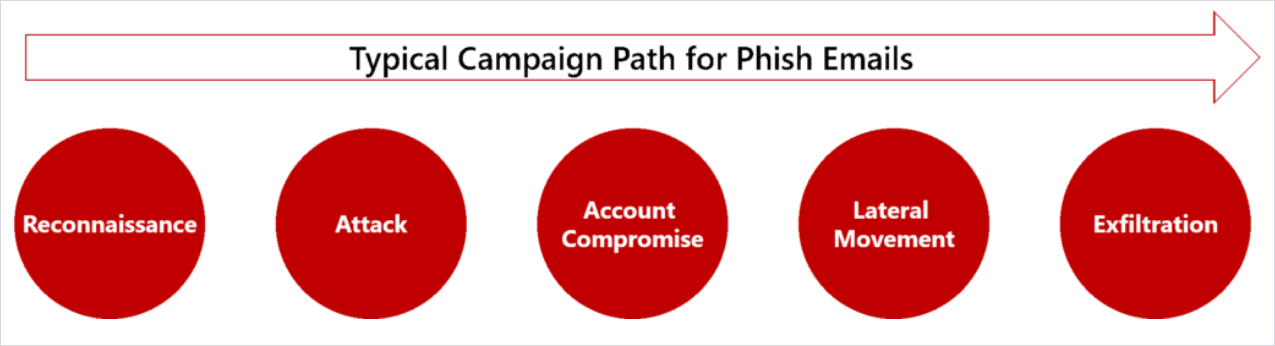
Figure 2. Research and the attack are the first steps in a longer strategy to exfiltrate sensitive data.
Step 2: Identify the credible source
Now let’s consider a new executive who receives an email late at night from their boss, the CEO. The CEO is on a trip to China meeting with a vendor, and in the email, the CEO references the city they’re in and requests that the executive immediately wire $10,000 to pay the vendor. The executive wants to impress the new boss, so they jump on the request right away.
How did it happen?
In spear phishing schemes, the attacker needs to identify a credible source whose emails the victim will open and act on. This could be someone who appears to be internal to the company, a friend, or someone from a partner organization. Research into the victim’s relationships informs this selection. In the first example, we imagined a would-be job seeker that the victim doesn’t know. However, in many spear phishing campaigns, such as with our executive, the credible source is someone the victim knows.
To execute the spear phishing campaign against the executive, the attackers uncovered the following information:
Identified senior leaders at the company who have authority to sign off on large sums of money.
Selected the CEO as the credible source who is most likely to ask for the money.
Discovered details about the CEO’s upcoming trip based on social media posts.
Why it might work: Targeting executives by impersonating the CEO is increasingly common—some refer to it as whale phishing. Executives have more authority and access to information and resources than the average employee. People are inclined to respond quickly when the boss emails—especially if they say it’s urgent. This scenario takes advantage of those human power dynamics.
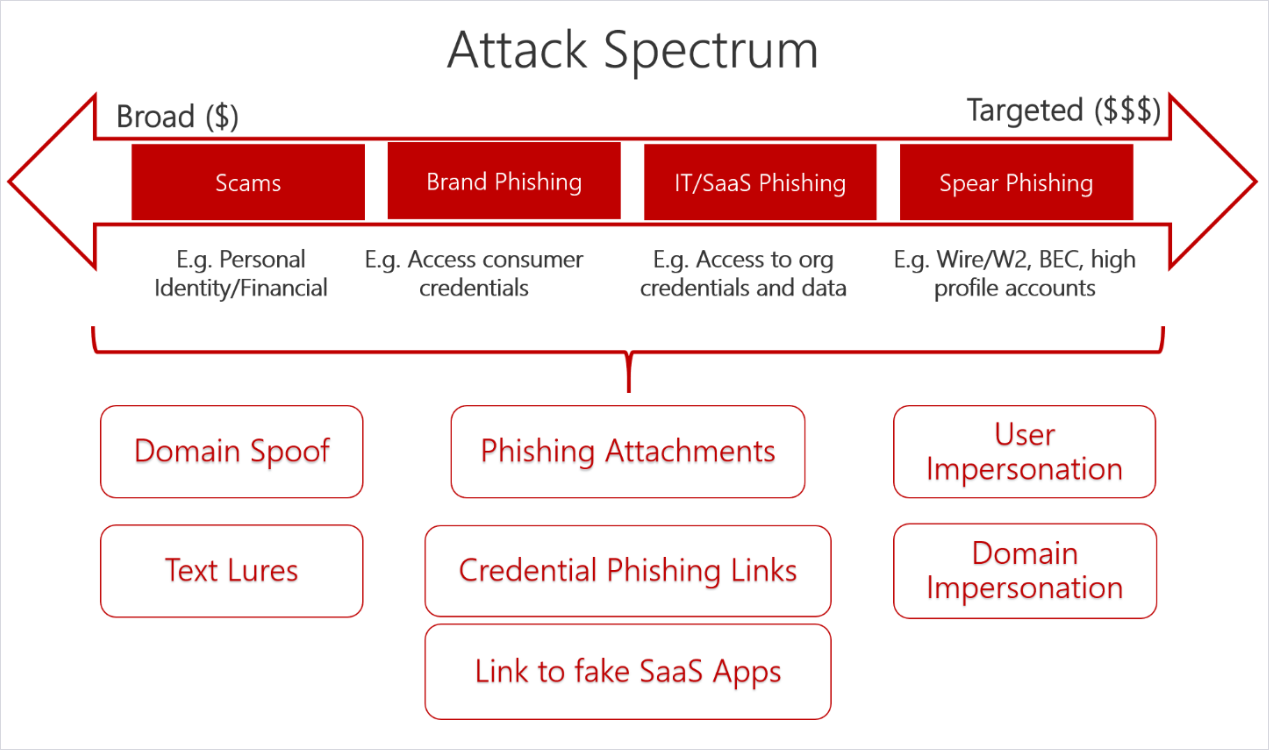
Figure 3. The more targeted the campaign, the bigger the potential payoff.
Step 3: Victim acts on the request
The final step in the process is for the victim to act on the request. In our first example, the human resources recruiter could have initiated a payload that would take over his computer or provide a tunnel for the attacker to access information. In our second scenario, the victim could have wired large sums of money to a fraudulent actor. If the victim does accidentally open the spear phishing email and respond to the call to action, open a malicious attachment, or visit an infected webpage, the following could happen:
The machine could be infected with malware.
Confidential information could be shared with an adversary.
A fraudulent payment could be made to an adversary.
Catch more phishy emails
Attackers have improved their phishing campaigns to better target your users, but there are steps you can take to reduce the odds that employees will respond to the call to action. We recommend that you do the following:
Educate users on how to detect phishing emails—Spear phishing emails do a great job of effectively impersonating a credible source; however, there are often small details that can give them away. Help users identify phish using training tools that simulate a real phish. Here are a few tells that are found in some phish that you can incorporate into your training:
An incorrect email address or one that resembles what you expect but is slightly off.
A sense of urgency coupled with a request to break company policy. For example, fast tracking payments without the usual checks and procedures.
Emotive language to evoke sympathy or fear. For example, the impersonated CEO might say you’re letting them down if you do not make the urgent payment.
Inconsistent wording or terminology. Does the business lingo align with company conventions? Does the source typically use those words?
Encourage users to communicate potential phishing emails—It’s important that users flag phishing emails to the proper team. This can be done natively within many enterprise email systems. It can also be helpful if users talk with their peers about the phishing emails they receive. Spear phishers typically don’t send blast emails; however, they may select several people from the same department or with business relationships. Talking will alert other users to be on the lookout for phishy emails.
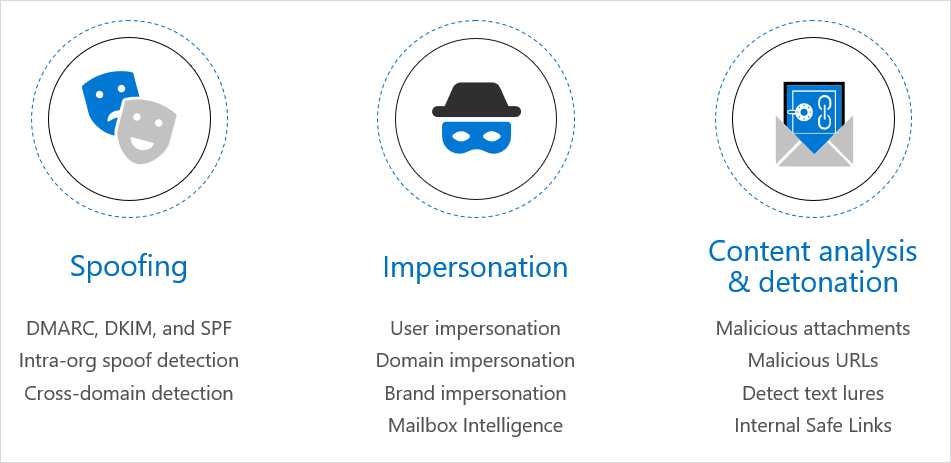
Figure 4. Enhanced anti-phishing capabilities are available in Microsoft Office 365.
Deploy technology designed to block phishing emails—If users don’t receive the phishing email, they can’t act on it! Deploy technology that can help you catch phishing emails before they land in someone’s inbox. For instance, Office 365, one of the world’s largest email providers, offers a variety of protection against phishing attacks by default and through additional offerings such as Microsoft Advanced Threat Protection (ATP) anti-phishing. Importantly, Microsoft has both been advancing the anti-phishing capabilities of Office 365 (see Figure 4 above) and improving catch rates of phishing emails.
This final module cover preparing your CMDB for self-service, configuring virtualization self-service and connecting your tenants to cloud resources. This closes out part 1 of building for the cloud.
This section addresses planning and building your various templates as well as installing your applications. You will also learn about Runbook Automation and best practices for cloud; building a reliable provisioning workflow and much more.
This module provides an overview of functional requirements and how to plan the Cloud Fabric. It also addresses the requirements for multi-tenancy and how to plan your cloud infrastructure on Windows Server 2012.
In this session you will learn how to configure the storage layer, physical and virtual network. In addition it covers bringing the hypervisor under management.
How to build intelligent, cross-device apps with little to no code, here is a demo by Microsoft’s, Charles Lamanna
Now you can use the Power Platform to build low to zero code, intelligent, scalable, and automated, cross-device apps in a fraction of the time. You’ll see a demonstration of the latest updates from AI Builder to help you to more easily infuse intelligence into your apps and processes. Plus, check out Robotic Process Automation, for next-gen user interface automation, that uses machine learning to modernize how you can now interact with your legacy apps. At Microsoft Ignite 2019, this was session THR2274: Microsoft Power Platform: Going under the hood of Microsoft Dynamics 365, PowerApps, Microsoft Flow, and Power BI with Charles Lamanna. Charles Lamanna is the Corporate Vice President for Citizen Application Platform. This includes PowerApps, Microsoft Flow, Common Data Service, AI Builder, and the Dynamics 365 Platform. Charles has worked across many products at Microsoft, including Exchange Online, Microsoft Azure, and Dynamics 365. Charles originally joined Microsoft in 2013 when MetricsHub, a company he founded, was acquired by Microsoft and integrated into Microsoft Azure.
DevOps, the cloud, and new database technologies mean our jobs as database administrators (DBAs) are changing at an ever-faster pace. If you’re fascinated by data and all the things you can do with it, it’s a thrilling time to be in the business. Here are five of the skills we see as essential parts of the modern DBA’s toolkit.
Expertise with multiple technologies: The one-size-fits-all approach to databases is fading. Just as application developers are moving toward a microservices model that focuses on the right tool for the job, organizations are choosing databases according to specific workload needs. The more you know about Hadoop, NoSQL, graph, and other technologies, the better-positioned you will be to make a positive contribution to the conversation.
Collaboration: Speaking of conversations, DBAs will increasingly need to become contributing members of application teams rather than siloed specialists off in their own corners. DevOps tend to break down the barriers between IT functions. Understanding how applications work, and, even better, how they deliver business value, puts you in a position to be a creative problem solver and all-around data expert.
Data science skills: Machine learning and AI are some of the fastest growing uses of data in the enterprise today. Making these technologies work efficiently and getting superior results depends on good data, which depends on you and your specialized skills.
Cost optimization: In an on-premises world, most DBAs aren’t deeply involved in cost conversations unless there’s a big IT capital investment taking place. In the cloud, database configuration has a direct impact on the bottom line. Understanding how to manage the technology in cost-optimized ways can help your organization do more with its IT budget.
Cloud (and edge) everything: There will be on-premises databases around for a long time, but the cloud is going to continue growing in importance. The good news is that it can help automate a lot of the infrastructure-related drudgery that characterizes classic DBA jobs. The even better news is that it frees you to do more creative things. In many industries such as retail, manufacturing, and aerospace, edge computing is becoming even more interesting than cloud and requires further evolution of database approaches. If you’re an expert here, you can write your own ticket for several years to come.
IT has always been a fast-evolving field and it’s only going to accelerate for DBAs. Now’s the time to skill up and take the lead. To learn more about what you can do with Microsoft SQL Server 2019, check out the free Packt guide, Introducing Microsoft SQL Server 2019. If you’re ready to jump to a fully managed cloud solution, check out the Essential Guide to Data in the Cloud.
Microsoft is providing hands on virtual labs on their Azure cloud services so that we can all learn how to manage and support cloud based servers and applications.




 DevOps, the cloud, and new database technologies mean our jobs as database administrators (DBAs) are changing at an ever-faster pace. If you’re fascinated by data and all the things you can do with it, it’s a thrilling time to be in the business. Here are five of the skills we see as essential parts of the modern DBA’s toolkit.