Quitting your job

The bottom line on how to quit your job

Thinking about quitting your job? Although you might have dreams of making an epic exit, you can quit a job with class and take the right steps to secure your references and maintain professional relationships before you move in a new direction. There’s some science behind how to quit your job, and there are things you can do to make your next career move easier and increase your chances of a smooth transition.

Quit When You Have Other Options

  1. Do: Have something lined up, such as a new job, training program or school.
  2. Do: Quit with a plan in mind for your future career.
  3. Don’t: Rage quit and hope for the best.
  4. Don’t: Quit, take a trip to the Bahamas and use up all of your savings.

You’ve probably heard that you should never quit your job unless you have another job lined up. It’s a fact that hiring managers are more likely to recruit candidates who are actively employed elsewhere rather than those who have been unemployed for a while. Ideally, it is best to secure a new position before you quit, but that doesn’t mean you absolutely can’t jump ship until you have a job offer in hand. If you have some money saved up to keep you afloat while you attend a training program or additional schooling, quitting your job can be a viable option. The biggest key to acquiring a new job is proving to hiring managers that you’re qualified, and educational programs that get you the skills you need for the position you want can be your ticket to success.

Bottom line: It’s best to wait to quit your job until you have options or a concrete plan to make yourself a more suitable candidate for a new position.

Give Enough Notice

  1. Do: Leave on a good note.
  2. Do: Try to finish major projects before you leave.
  3. Don’t: Give your boss 24 hours’ notice.
  4. Don’t: Completely ghost your employer and just stop showing up.

It’s usually a good idea to give your supervisor at least two weeks’ notice before you pack up your desk. If you have a decent rapport with the higher-ups and time allows for you to give a month’s or three weeks’ notice, you may decide that’s the best course of action, particularly if you know your company needs more time for you to tie up any loose ends or hit benchmarks on major projects. Even if you’re completely fed up with your job, you probably don’t want to leave your employer in the lurch. Some companies have policies about how much notice is required – or that they escort employees out upon giving notice – so make sure you understand the protocol to prepare yourself and maintain your status as a respectable employee.

Bottom line: Be considerate.

Be Diplomatic (and Reasonably Honest) with Your Boss

  1. Do: Note that you’re quitting because of your career aspirations.
  2. Do: Express gratitude for the opportunities you’ve been given at work.
  3. Don’t: Burn bridges by delving into all of your personal grievances.
  4. Don’t: Make a scene/take a bat to the copy machine.

Leaving your job on good terms is always preferable to the alternative. You may not have the most stellar relationship with your boss, but that doesn’t mean you should air all of your grievances or make a scene when you quit. Try to be diplomatic when you resign from your position, providing your supervisor with some honest reasons why a career change aligns with your future career goals. If you believe the company could do some things to improve employee retention, you may also want to cautiously provide your boss or HR with constructive feedback when you meet to discuss your resignation. Be careful not to go overboard with criticism, though, and remember that you’re on your way out, headed for bigger and better things.

Bottom line: Even if you hate your job or boss, keep in mind that you’re on your way out.

In Most Cases, Put It in Writing

  1. Do: Check your company’s policy regarding resignation.
  2. Do: Provide your employer with pertinent information in writing.
  3. Don’t: Go into excessive detail about why you’re quitting.
  4. Don’t: Write a 10-page manifesto.

Twenty years ago, formal resignation letters were standard protocol, but nowadays, it can feel a bit stilted or antiquated to hand in a printed formal letter. Still, it’s best to put it in writing in some fashion, unless you have a particularly casual and warm relationship with your boss and feel comfortable forgoing the letter and opting for a phone call or in-person announcement. You should also make sure you’re aware of any company policies regarding how employees should give notice. Make sure you go back to the paperwork you signed when you were hired to remind yourself of any required protocol and see if you signed a non-disclosure or non-compete agreement.

It’s becoming more and more common for employees to resign via email, and this might be a possibility for you, depending on your company culture. If your company is forward-thinking and tech-savvy, an email probably suffices in terms of how to quit your job in the beginning stages of the process. If you know it’s more typical for employees to quit using a typed and printed letter, you may want to go that route. Gauge the company culture and standard practices before you decide how you want to deliver the news.

Whether you’re writing an email or a formal letter, you’ll probably want to include:

  • The date of your official last day.
  • A statement or statements of appreciation for what you’ve gained as an employee of the company.
  • An offer to help the company however possible during your final weeks as they transition to find your replacement or assign your responsibilities to current or new employees.
  • Any other pertinent information you feel comfortable sharing.

Don’t be afraid to keep your letter simple. It doesn’t have to be longer than a few short paragraphs. And don’t feel obligated to go into great detail about why you’re leaving. If you want, you can discuss that further when you meet with higher-ups about your departure. And, of course, be professional. No need to write “I hate my job!” in your letter, even if that’s how you feel.

Bottom line: Even if you hate your job or boss, keep in mind that you’re on your way out.

Share the News with Coworkers Carefully

  1. Do: Be aware of company culture.
  2. Do: Be open with coworkers you trust.
  3. Don’t: Badmouth your boss to coworkers.
  4. Don’t: Badmouth your coworkers.

If you’ve formed close relationships with some of the people you work with, you may decide to tell them about your resignation before you tell your supervisors. There’s no harm in telling coworkers you trust about your professional transition before anyone else knows, as long as you know they’ll be able to keep it under wraps until you make an official announcement. Typically, your supervisor will inform the rest of your company or team (if you work at a large corporation) that you’re quitting after you formally meet with them to discuss it.

If your company culture is hostile, you may want to keep your plans to yourself until you officially put in your notice. You may also want to be careful about how much you discuss your new position or career path at the water cooler. If almost everyone at your company or on your team is hoping to quit soon, being too enthusiastic about your good news could cause some ripples of resentment or bitterness, which will ultimately make the work environment even more hostile.

Bottom line: Don’t stir the pot.

Get Your Paperwork in Order

  1. Do: Review employment agreements.
  2. Do: Understand how your benefits will change.
  3. Don’t: Take a trip to the shredder and destroy the paperwork you need.
  4. Don’t: Ignore legal clauses regarding disclosure and competition.

Make sure you double-check all your paperwork regarding compensation for your last weeks at the company. Additionally, you should read all the fine print on your health insurance and 401(k) documentation to make sure you’re aware of how your benefits will transition after your last day. If you signed any sort of non-disclosure or non-competition form when you started your job, it’s best to understand what you can and cannot legally disclose or do at your next job that would conflict with your agreements. If you’re leaving one job for another one, make sure the offer is official and that any related paperwork has been signed before you make any announcements. You don’t want to lose both jobs on a technicality.

Bottom line: Know what you’ve signed.

Secure Your References

  1. Do: Reach out to colleagues you’d like to use as references in the future.
  2. Do: Ask for endorsements on LinkedIn.
  3. Don’t: Assume that you won’t need references in the future.
  4. Don’t: Be afraid to ask for favors.

If you know your boss or coworkers think highly of you, ask if you can use them as references in the future. You never know when you might need them to put in a good word for you. Also, it’s an excellent idea to ask for endorsements of your skills and recommendations on LinkedIn before you leave. Even if you’re moving directly to a new position, it’s not a bad idea to cover all your bases and prepare for the possibility that in the future you’ll be looking for another new job. Good references, recommendations and endorsements of your qualifications can go a long way in terms of establishing your professional credibility.


Windows Server Upgrade paths

In-place upgrade from Windows Server 20xx to a different version are shown in the table below. The following upgrade paths are officially supported by Microsoft.

Image

From the table above Microsoft does not support an upgrade from Server 2012 R2 directly to Server 2022, so it would take an intermediate step or people will have to resort to a clean install.

Whether meet the prerequisites for upgrading?

For details about the upgrade steps, please refer to the following steps: Perform an in-place upgrade of Windows Server | Microsoft Learn

What went wrong with the upgrade and can you provide a screenshot?

Best Regards,

Hania Lian

The AI impact

  logo   AI Impact: The Future of IT, Tech & Cybersecurity AI is becoming increasingly vital in tech, IT and cybersecurity as businesses are progressively integrating AI into their operational procedures. Tech professionals are turning to AI due to its ability to streamline and automate complex processes and routine tasks. For cybersecurity professionals, AI can facilitate real-time threat detection and response. What you will learn: How generative AI is shaping the future of technology and IT How to deconstruct the promises of AI in cybersecurity An understanding of the need to interact properly with AI Why AI can help us become better professionals Rectangle: Rounded Corners: Register Now Register Now

Post Quantum Computing

The National Institute of Standards and Technology (NIST)

#NIST launched its PQC standardization program in 2016, with the goal of developing cryptographic methods that can withstand quantum computing threats. The latest announcement introduces the first set of standardized algorithms: one for key agreement and two for digital signatures. These algorithms are designed to ensure the confidentiality, integrity, and authentication of sensitive data, keeping digital communications secure against emerging quantum threats.

FIPS 203: Derived from Kyber, this standard is used in key agreement protocols such as TLS, replacing traditional methods like Diffie-Hellman. It offers fast performance despite the use of larger public keys and ciphertexts.

FIPS 204: Based on Dilithium, this standard is used for digital signatures. It provides faster verification than current methods like ECDSA and RSA, though it requires larger signatures (2.5KB) and public keys (1.3KB) and has roughly double the signing time.

FIPS 205: Built on the security of SHA-2 or SHA-3, this standard offers strong security with very small public keys (32 bytes) but generates larger signatures, around 7KB. It is particularly well-suited for applications like firmware updates, where rapid verification is crucial.

Today’s announcement takes place within a larger regulatory framework, including the White House’s National Security Memorandum, NSM-8, which requires the adoption of post-quantum cryptography (PQC). To transition to these new algorithms effectively, businesses must start by assessing their current cryptography usage. Whether conducted manually or through automated tools, this inventory process is critical. Proper tools and thorough testing are essential to facilitate a seamless shift from old algorithms to the new standards.

If Quantum computing was not a reality, why are there standards being implemented.

Be aware that what we see, or what they show us has already happened.

Windows 10 Explorer Fix

Windows Explorer shortcuts not working giving Error message:

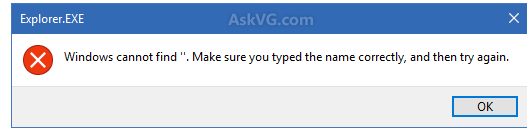
Windows cannot Find, Make Sure You Typed the Name Correctly, and Then Try Again.

Today I encountered a weird issue in Windows 10 operating system. I usually open Windows Explorer by using WIN+E hotkey. When I pressed WIN and E keys together, Windows showed following error message:

[Explorer.EXE]

Windows cannot find ”. Make sure you typed the name correctly, and then try again.

Then I tried to open Windows Explorer by double-clicking on This PC icon on Desktop and it opened fine.

Finally I was able to address this annoying issue and fixed it using a very simple solution.

If you also face this problem ever, you may try following working fix:

1. Open Windows Explorer (or File Explorer or This PC) by double-clicking on its desktop icon or by clicking on its pinned icon on Taskbar. Now click on View tab in Ribbon and then click on Options.

If you are unable to open Windows Explorer and get above mentioned error message, open Control Panel and click on “File Explorer Options” icon.

2. Now check the option “Open File Explorer to:“. It would be set to “Quick access“. Click on the drop-down box and select “This PC” option.

Open_File_Explorer_This_PC_Quick_Access_Windows_10.png

3. Apply the changes and it’ll fix the problem.

Now you’ll no longer receive any error message while trying to launch Windows Explorer.

It seems a “Quick Access” related bug to me and when we disable “Quick Access” option in File Explorer options, it solves the issue.

Hackers want your PII

PII = Personal identifiable information examples below.

  • Name: Full name, nickname, alias, or initials
  • Date of Birth: Birthdate, age, or age range
  • Biometrics: Fingerprints, facial recognition data, iris scans, or voiceprints
  • Social Security Number: SIN, taxpayer identification number, or other government-issued identification numbers
  • Identity Number: Some countries use this instead of the SIN number above
  • Financial Information: Bank account numbers, credit card numbers, financial account numbers, or payment processing information
  • Medical Records: Health records, medical history, or insurance information
  • IP Addresses: Internet Protocol addresses, which can be used to identify a device or individual
  • Email Addresses: Personal email addresses or login credentials
  • Phone Numbers: Home, work, or mobile phone numbers
  • Physical Addresses: Home, work, or mailing addresses
  • Passport Number: Passport identification number or travel documents
  • Driver’s License Number: Driver’s license or state ID number
  • Taxpayer Identification Number: Employer Identification Number (EIN) or Individual Taxpayer Identification Number (ITIN)

Here are some of the means that Hackers use to get this information from you.

1. Spoofing

Does caller ID show the same area code and prefix as yours? That incoming call could be from anywhere — even a foreign country. Spoofing is falsifying data on caller ID to disguise who’s on the line. In a bid for authenticity, the spoofed number could belong to a legitimate government agency or a business known to you.

2. Phishing

So-called “phishing” emails, calls, texts and letters try to trick you into sending cash or disclosing personal information. Or, the correspondence aims to allow a bad actor to infiltrate your computer device and steal sensitive information. Microsoft, for example, has warned that cybercrooks send phishing emails from rnicrosoft.com—note the “r” and “n” were combined to appear at a glance as an “m.” The word phishing — which dates to 1996 — combines “fishing” and “phreaking,” the latter a term for using an electronic device to avoid paying for phone calls, says Merriam-Webster. Phreaking likely was born from the marriage of the words “phone” and “freak.”

3. Fake profiles

Anybody can disguise his or her identity on social media, dating platforms or other sites. In 2019, the Pentagon warned about an increasing number of impersonator accounts on Twitter that hijacked the identity of Marine Gen. Joseph Dunford, then chairman of the Joint Chiefs of Staff. That prompted the Air Force chief of staff to chime in: “The same goes for me — I won’t ask for money, your email account or other personal information. Please continue to report impostor pages.”

4. Fake photos:

Images can be copied or stolen from the internet — or altered — to lend credence to a bogus profile or website.

5. Fake entities

Phony businesses, charities, political action committees and the like — they’re sheep’s clothing for the wolves at your door.

6. Fake claims

Bad actors use a variety of scripts to persuade you to open your wallet and drain your financial accounts. Examples: “You’ll be arrested if you don’t …” or “You’ve won a prize, but first must pay ….”

7. Fake names, credentials and badge numbers

Names, titles and such may suggest authority, but in reality be phony baloney.

8. Computer pop-ups

Pop-up warnings can show up on your computer. Alarms may sound. Click on a suspicious link or open an attachment and malware — that’s software used for malicious purposes — can compromise your computer system and steal your data. Never call the phone number that appears on a computer pop-up.

9. Robocalls

About 58.5 billion robocalls — a record — bombarded phones in the U.S. in 2019, and 25.9 billion, or 44 percent, were scam calls, according to an industry estimate. Huge numbers of internet-based calls can be made every day at very little cost to con artists, even those overseas.

10. Lead lists

These are rosters of people who have fallen victim to cons and, as such, potentially are soft targets for more mischief. Criminals swap and sell what they callously call “sucker lists.”

11. Secrecy

Crooks often insist their targets keep silent about what they’re being instructed to do. They’re trying to prevent a family member or friend from stopping a scam in its tracks.

12. Persuasion

Criminals excel at blarney and use flattery and charm to ingratiate themselves and gain your trust. Alternatively, they may threaten violence to frighten you to act. The goal is the same: to compel you to cough up cash and or sensitive data. And the perpetrators are nothing if not persistent.

Copilot learning

Microsoft Learn

Copilot learning hub

Copilot is an AI assistant powered by language models, which offers innovative solutions across the Microsoft Cloud. Find what you, a technical professional, need to enhance your productivity, creativity, and data accessibility, and make the most of the enterprise-grade data security and privacy features for your organization.

Start your Copilot learning journey

Latest Security Issues