The first step is to select the section you want your readers to arrive at when they click the page jump. To do this, we can create what is known as an “anchor” on the block you want to jump to.
Click on the block you want to add the anchor to. Many common blocks support anchors, including Paragraph, Heading, Image, Columns, and Buttons.
View the block’s settings in the right sidebar. If you do not see the sidebar on the right, click the Settings icon in the top right corner to bring up the settings. This icon looks like a square with two uneven columns:
The settings icon in the top right corner
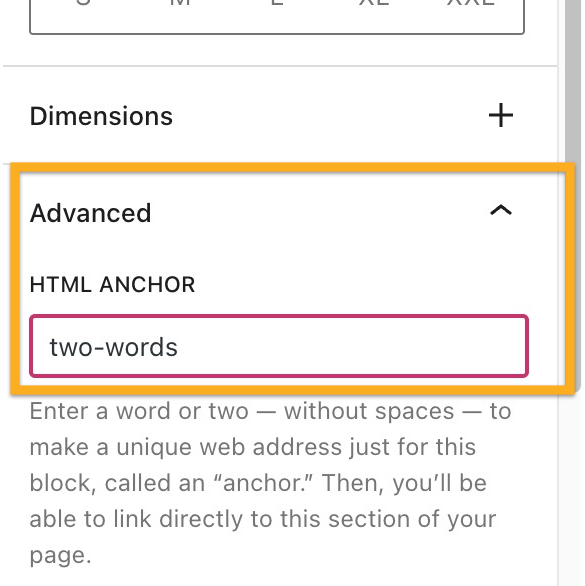
At the bottom of the block settings, click on Advanced.
Type a word in the HTML Anchor box. This will become your anchor. Be sure to use a unique word that isn’t already being used as an anchor somewhere else on the page. If you want to use more than one word, it will automatically insert a hyphen (-) between the words, like this: two-words:
Step 2: Link to Your Anchor
Next, we’re going to create the page jump link itself. Your visitors will click on this to arrive at the section you created in step 1.
Type some text, or add an image, button, or navigation menu item for your readers to click.
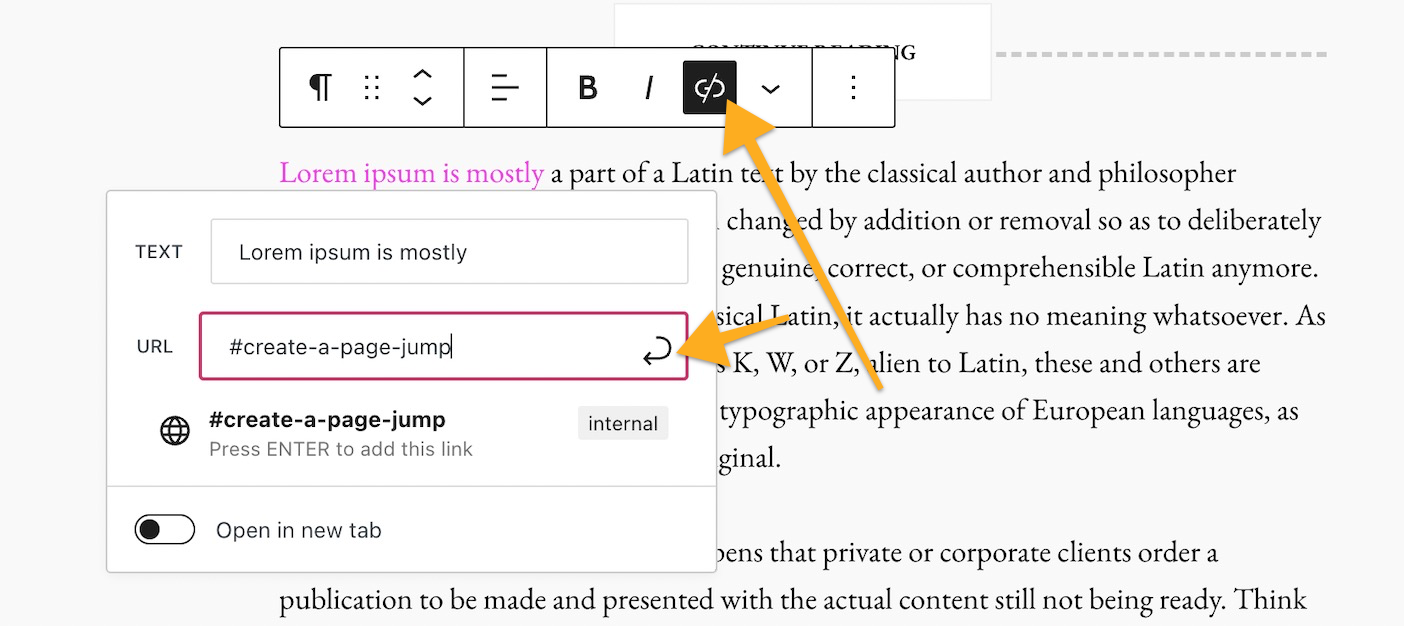
Select the text/image/button/menu item and click the link option in the block’s toolbar. The link option is an icon that looks like the actual link of a chain, as highlighted here:
Type in the HTML Anchor you created in Step 1, starting with the hashtag (#) symbol. For example, if you created an anchor named create-a-page-jump you would type your link as #create-a-page-jump
Click Save/Update/Publish in the upper right corner of the editor to save your changes.
That’s it! You can now test your link on the public page to make sure the link you created in Step 2 leads you to the anchor you created in Step 1. Note that the page jump links will not work when you preview a page or post, so test on the published version.
Page Jumps in a Navigation Menu
You can create page jumps from your navigation menu that link to a specific part of a page. This is common for sites that have a long scrolling homepage. Page jumps make it easier for visitors to view the section of the homepage they want.
The first step is to create an anchor as the spot to jump to.
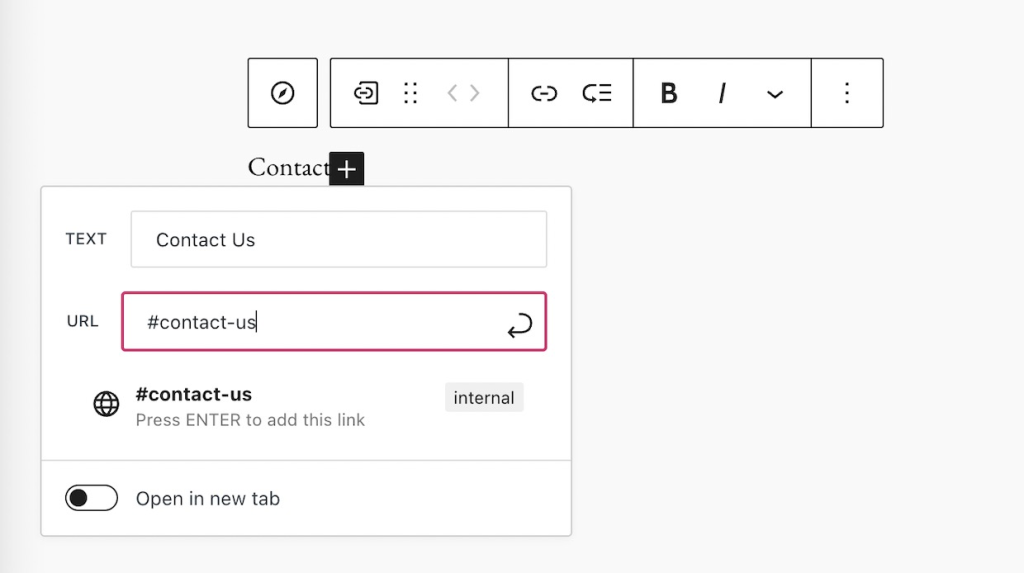
In your menu, add a new item that’s a Custom Link.
In the Text field, write whatever you would like the menu item to be called. This will not affect the page jump.
In the URL field, write your anchor with a hashtag (#) symbol in front of it as described above.
Adding a Page Jump in the menu
Keep in mind that a page jump like #my-anchor will only work on the same page that the anchor is on. If you wish to jump to a section of a different page, see the next section of this guide.
Jump to a Different Page
Page jumps don’t have to be used only for linking to sections within the same page. You can use a page jump to link from one page to a specific area on another page.
The difference is that instead of linking just to the anchor, like how we wrote our link as #create-a-page-jump in step 2 above, we would link to the full page URL plus the anchor.
For example, if your page has the following URL:
https://yourgroovydomain.com/example
and you create an anchor called unique-identifier on that page, then the full jump link would be:
Case study | Panasonic’s Strategic Adoption of the ITIL 4 Framework
Panasonic has been a leader in manufacturing excellence for decades. But as the digital era reshapes industries, Panasonic Connect is driving a bold shift—moving from product-focused operations to service-driven solutions. Dive into our case study to discover how ITIL 4 has empowered Panasonic to redefine its approach to service management.
For nearly a century, Panasonic has been synonymous with manufacturing excellence, pioneering technologies and products that have defined generations. However, the growth of service-oriented digital enterprises has necessitated a bold shift from its traditional manufacturing roots.
This initiative has been led by Panasonic Connect, which plays a central role in the growth of the Panasonic Group’s B2B solutions business and provides new value to its customers by working with them on the ground, facing their challenges alongside them. Panasonic partnered with HP Japan to offer flexible ITIL 4 modular training sessions through HPE Education Services.
When Panasonic Connect’s CEO announced a policy of shifting from manufacturing goods to providing services, the organization was operating a well-established manufacturing system, based on a waterfall-type, development-centered and vertically-divided organization with an emphasis on quality.
As the company shifted from “Monozukuri” (making goods) to “Kotozukuri” (providing services), there were many discussions about what needed to change in both the quality department and the management system to promote a service-focused business.
Company executives had commented that while other companies were solidifying their recurring business models, Panasonic was still maintaining the image of a 20th century manufacturer. They acknowledged that creating and selling goods is completely different from understanding customers’ management issues and proposing service solutions. This requires the ability to organize services but – at the time – Panasonic did not have significant experience with the delivery of recurring services.
Consequently, the company saw the need to make changes at both the management level and the “genba” (the frontline of operation).
This case study explores Panasonic’s strategic adoption of the ITIL 4 framework, highlighting the company’s innovative leap forward in aligning with contemporary service management best practices.
2. Challenges
PANASONIC FACED A MULTITUDE OF CHALLENGES IN ITS TRANSFORMATIVE JOURNEY:
CULTURAL SHIFT
Transitioning from a globally-renowned and well-established manufacturing mindset to a service and digital-focused culture required a change in processes and a significant shift in organizational thinking. This involved seeing differences in business models, job and quota allocation between selling and servicing, monetization and the need for agile development in a high-velocity environment. It became important to embrace a variety of knowledge and best practices to promote the service business.
KNOWLEDGE GAPS:
Despite its global presence, Panasonic recognized the need for a uniform understanding of service management. There was a crucial requirement to educate its workforce in ITIL 4 concepts across various geographies.
STRATEGIC IMPLEMENTATION
Integrating ITIL 4 into the existing Panasonic business model posed significant challenges, requiring a strategic approach to align the new framework with the company’s legacy systems and processes. This required organizations and employees with knowledge of ITIL best practice and an understanding of IT services, along with the ability to expand the use of high-velocity development mechanisms, infrastructure, and modern tools to design digital services.
“The ITIL framework sets a common goal between individuals, teams and the organization. It has been very meaningful for us to learn about the service value system in order to create value together.”
IN RESPONSE TO THESE CHALLENGES, PANASONIC UNDERTOOK A MULTI-FACETED APPROACH:
OBTAINING EXECUTIVE BUY-IN
The initiative began with gaining robust support from top-tier management, securing the necessary leadership endorsement to drive change. This included explaining to management the need for people who understand ITIL and service management practices. As a result, the CEO supported ITIL learning as part of continued employee development.
EMPLOYEE EDUCATION
Panasonic initiated training in ITIL 4 Foundation certification for its workforce, fostering a common language and a foundational understanding of service management practices.
COMMUNICATION STRATEGY
To ensure the ITIL 4 message resonated throughout the company, Panasonic developed a comprehensive communication plan. This included information cascades from senior leadership through the ranks, ensuring all employees understood the value and purpose of the change. For instance, using examples of service configuration and processes from other industries, such as banking, fostered discussions about how ITIL is a driver of service stability and value. This ensured that more people joined the circle of knowledge, generated interest in ITIL and started independent conversations about the framework.
MODULAR TRAINING
Panasonic partnered with HPE Education Services – Japan to offer flexible ITIL 4 training sessions. These were customized to cater to individual needs and schedules, ensuring maximum accessibility and uptake.
4. Results
CULTURAL CHANGE
Panasonic employees embracing continuous improvement and service management philosophies indicates a shifting organizational mindset. This means the company is both getting closer to customers and focusing on speed more than ever before.
In addition, there is now more agility in product development, therefore moving to market more quickly. Meanwhile, ITIL processes are creating greater agility in incident management. Customers are seeing a difference in delivery speed and Panasonic employees recognize the value in making these improvements.
ITIL 4 FOUNDATION UPTAKE
A notable milestone was reached with 2,000 employees obtaining their ITIL 4 certification, indicating successful initial adoption among the workforce.
ITIL 4 ADVANCED MODULES UPTAKE
The introduction of more advanced ITIL 4 courses in Japanese is anticipated to deepen the understanding and implementation of the framework.
As of now, 10 employees have attained the ITIL 4 Managing Professional designation and numerous others have completed advanced ITIL courses:
ITIL 4 Specialist: Create, Deliver and Support
ITIL 4 Strategist: Direct, Plan and Improve
ITIL 4 Specialist: Drive Stakeholder Value
ITIL 4 Specialist: High-velocity IT
ITIL 4 Leader: Digital and IT Strategy
ENGAGEMENT INDICATORS
Active participation in ITIL 4-dedicated channels on Microsoft Teams demonstrated a growing engagement and interest in service management concepts.
EMPLOYEE FEEDBACK
The training program was well-received, shown by a high Net Promoter Score of plus 15, with 40% of Panasonic respondents expressing strong support for the ITIL courses. Except for in-house training on management philosophy, the support rate for ITIL 4 training is among the highest at Panasonic.
CULTURAL CHANGE
Panasonic employees embracing continuous improvement and service management philosophies indicates a shifting organizational mindset. This means the company is both getting closer to customers and focusing on speed more than ever before.
In addition, there is now more agility in product development, therefore moving to market more quickly. Meanwhile, ITIL processes are creating greater agility in incident management. Customers are seeing a difference in delivery speed and Panasonic employees recognize the value in making these improvements.
ITIL 4 FOUNDATION UPTAKE
A notable milestone was reached with 2,000 employees obtaining their ITIL 4 certification, indicating successful initial adoption among the workforce.
ITIL 4 ADVANCED MODULES UPTAKE
The introduction of more advanced ITIL 4 courses in Japanese is anticipated to deepen the understanding and implementation of the framework.
As of now, 10 employees have attained the ITIL 4 Managing Professional designation and numerous others have completed advanced ITIL courses:
ITIL 4 Specialist: Create, Deliver and Support
ITIL 4 Strategist: Direct, Plan and Improve
ITIL 4 Specialist: Drive Stakeholder Value
ITIL 4 Specialist: High-velocity IT
ITIL 4 Leader: Digital and IT Strategy
ENGAGEMENT INDICATORS
Active participation in ITIL 4-dedicated channels on Microsoft Teams demonstrated a growing engagement and interest in service management concepts.
EMPLOYEE FEEDBACK
The training program was well-received, shown by a high Net Promoter Score of plus 15, with 40% of Panasonic respondents expressing strong support for the ITIL courses. Except for in-house training on management philosophy, the support rate for ITIL 4 training is among the highest at Panasonic.
5. Next Steps
SCALING EDUCATION:
Panasonic plans to increase the number of ITIL 4 Foundation-certified employees, with a focus on managerial staff to reinforce service management practices at the leadership level.
INTEGRATION OF PRACTICES:
Panasonic aims to align ITIL 4 practices more closely with its business operations, ensuring that value creation is consistently informed by service management best practices.
CONTINUOUS IMPROVEMENT:
Regular reviews of the adoption process are undertaken, allowing Panasonic to refine its approach based on feedback and performance insights.
Panasonic’s ITIL 4 adoption narrative is more than a step towards transformation. It is a testament to its commitment to remaining at the forefront of business innovation. One current example is an entry and exit system that uses facial recognition technology.
By embracing ITIL 4, Panasonic is not just adapting to the modern service economy but is actively shaping it, ensuring the company’s longevity and relevance in the rapidly-evolving global marketplace.
“We need to continue to create and provide value together with our customers. And where – in the past – there was pressure not to fail, I think that there is now psychological safety that says it is okay to fail.”
PeopleCert recently joined Amazon as a seller! This means that we can now instantly order our Official ITIL, PRINCE2 and other books—without purchasing a certification. Delving into these high-quality materials at your own pace before committing to a certification enables you to tailor your learning journey to your individual needs. We’ll be adding new stock to our store, so have a look at our books on Amazon today and spread the word! Browse PeopleCert books
Threat modeling is a core element of the Microsoft Security Development Lifecycle (SDL). It’s an engineering technique you can use to help you identify threats, attacks, vulnerabilities, and countermeasures that could affect your application. You can use threat modeling to shape your application’s design, meet your company’s security objectives, and reduce risk.
There are five major threat modeling steps:
Defining security requirements.
Creating an application diagram.
Identifying threats.
Mitigating threats.
Validating that threats have been mitigated.
Threat modeling should be part of your routine development lifecycle, enabling you to progressively refine your threat model and further reduce risk.
Microsoft Threat Modeling Tool
The Microsoft Threat Modeling Tool makes threat modeling easier for all developers through a standard notation for visualizing system components, data flows, and security boundaries. It also helps threat modelers identify classes of threats they should consider based on the structure of their software design. We designed the tool with non-security experts in mind, making threat modeling easier for all developers by providing clear guidance on creating and analyzing threat models.
The Threat Modeling Tool enables any developer or software architect to:
Communicate about the security design of their systems.
Analyze those designs for potential security issues using a proven methodology.
Suggest and manage mitigations for security issues.
The SDL Threat Modeling Tool plugs into any issue-tracking system, making the threat modeling process a part of the standard development process.
The following important links will get you started with the Threat Modeling Tool:
In social engineering attacks, scammers impersonate trusted officials, like customer service representatives at a bank, to con unsuspecting victims out of millions of dollars every year. The “engineering” part doesn’t have to be technical in these types of attacks, which is part of what makes them such a pervasive threat. By pretending to be someone else, scammers aim to trick a person into giving them information that they shouldn’t. A social engineer doesn’t need to crack your password. Instead, they try to get you to give it to them over the phone by claiming there’s something wrong with your account, and that they’re here to help.
Impersonation scams involve fraudsters pretending to be from trusted organizations or individuals to steal personal information or money. These scams can start with a phone call, text, email, or message that appears to be from a legitimate source, such as a bank, government agency, or well-known business.
Common tactics include posing as a legitimate representative and claiming there is an urgent issue with your account, such as a security breach or unauthorized transaction. Scammers may also use caller ID spoofing to make it appear as if the call is coming from a trusted organization. They might have information about you, like your full name or address, which can make the scam seem more convincing.
To protect yourself, avoid giving out any information, especially passwords, PINs, or verification codes. Be wary of aggressive or urgent language and unusual requests. If you receive a call or message that seems suspicious, hang up and contact the organization directly using a verified phone number or website.
Phishing is a common type of cyber attack that targets individuals through email, text messages, phone calls, or any form of communication. A phishing attack aims to trick the recipient into falling for the attacker’s desired action, such as revealing financial information, system login credentials, or other sensitive information. Many are used to confirm an email address or a telephone number.
As a popular form of social engineering, phishing involves psychological manipulation and deception whereby threat actors masquerade as reputable entities to mislead people into performing specific actions. These actions often involve clicking links to fake websites, downloading and installing malicious programs, or divulging private information, like name, address, bank account numbers or credit card details.
Since the mid-1990s, the term “phishing” has been used to identify hackers who use fraudulent emails to “fish for” information from unsuspecting users. However, phishing attacks have become increasingly sophisticated and are now broken down into different types, including email phishing, spear phishing, smishing, vishing, and whaling. Each type is characterized by specific channels and methods of execution – email, text, voice, social media, etc. – all with a similar underlying intentions.
Microsoft Copilot is a generative artificial intelligence chatbot developed by Microsoft, designed to assist users with various tasks and enhance productivity. It integrates with multiple Microsoft applications and services, such as Windows, Microsoft 365, and GitHub, to support user efficiency and productivity.16 Copilot utilizes the Microsoft Prometheus model, which is built upon OpenAI’s GPT-4 foundational large language model and has been fine-tuned using supervised and reinforcement learning techniques.1 The chatbot can generate content, offer suggestions, and automate tasks, and it supports features like creating poems, generating songs, and using numerous languages and dialects.
This module explores the intricacies of Microsoft 365 Copilot, offering insights into its functionality and Microsoft’s dedication to implementing AI responsibly and ethically.
Discover ways to prompt Microsoft 365 Copilot in Word, PowerPoint, Teams, and Outlook to ask, analyze, and receive recommendations for fresh ideas and content. Whether you need specific information, comparative analysis, or helpful suggestions, Copilot is your goto tool.
This learning path examines the Microsoft 365 Copilot design and its security and compliance features, and it provides instruction on how to implement Microsoft 365 Copilot.
This Learning Path enables students to perform a series of Use Case exercises that build their Microsoft 365 Copilot skills in various business-related scenarios. Use cases include Executives, Sales, Marketing, Finance, IT, HR, and Operations.
To start voice dictation in Windows 11, you can press the Win+H keys together to open the Voice typing tool. Alternatively, you can go to Settings > Accessibility > Speech, and turn on the switch for Windows Speech Recognition. Once enabled, you can click the microphone icon to start dictation in any application where you can type text.
This article is for people who want to control their PC and author text using their voice with Windows. This article is part of the Accessibility support for Windows content set where you can find more information on Windows accessibility features. For general help, visit Microsoft Support home.
Voice access is a feature in Windows 11 that enables everyone to control their PC and author text using only their voice and without an internet connection. For example, you can open and switch between apps, browse the web, and read and author email using your voice. For more information, go to Use voice access to control your PC & author text with your voice.
Voice access is available in Windows 11, version 22H2 and later. For more information on Windows 11 22H2 new features, and how to get the update, see What’s new in recent Windows updates. Not sure which version of Windows you have? See: Find Windows version.
Dictate punctuation marks
To insert this
Say this
.
“Period” “Full stop”
,
“Comma”
?
“Question mark”
!
“Exclamation mark” “Exclamation point”
‘s
“Apostrophe-s”
:
“Colon”
;
“Semicolon”
” “
“Open quotes” “Close quotes”
–
“Hyphen”
…
“Ellipsis” “Dot dot dot”
‘ ‘
“Begin single quote” “Open single quote” “End single quote” “Close single quote”
To determine if Apache Log4j is installed on your system, you can use a combination of manual and automated methods. For Linux servers, you can run a command to search for files related to Log4j:
find / -type f -name log4j*
This command will list all files containing “log4j” in their names, which can help identify if Log4j is installed on your server.8
For Windows servers, you can use a similar approach by searching for files containing “log4j” in their names:
dir C:\*log4j*.jar /s
This command will search for files with “log4j” in their names in the C: drive and its subdirectories.3
Automated tools can also be used to scan for Log4j installations. One such tool is Syft, which can create a software bill of materials (SBOM) and help identify old Log4j versions:
syft dir:/ | grep log4j
This command will scan your server and search for Log4j files.3
Additionally, you can use a Python script or a Go package like log4jscanner to scan your system for vulnerable Log4j versions.43
Since Log4j is a Java library, it may be embedded within other Java applications, making it harder to detect. Therefore, it’s important to check all Java applications running on your system and consult their vendors for any dependencies on Log4j.3
For a more thorough check, you can also manually inspect the manifest files within JAR files to confirm the version of Log4j installed.3
Remember, these methods may not be foolproof, as Log4j can be embedded within other JAR files or applications. Therefore, it’s crucial to follow up with vendor advisories and ensure all applications are updated to the latest versions.