More blank page tricks

Word for Microsoft 365, Word 20XX

Page breaks tell Word where to start a new page. A manual page break might be making an unwanted blank page in your document.

  1. To see manual page breaks, switch to showing paragraph marks: Press Ctrl+Shift+8.
  2. Now you can select the page break and delete it.

A page break at the bottom of a Word page

Section break problems

In the middle of a document, deleting section breaks can cause formatting problems. In these cases, try changing the section break to one that doesn’t generate a new page. Here’s how:

  1. Double select the section break.
  2. On the Layout tab of the Page Setup dialog box, select the Section start drop down and select Continuous.
  3. Select OK.

Odd, Even, and Next cause blank pages
Next Page, Odd Page, and Even Page section breaks may create a blank page in your document. If the blank page occurs at the end of your document and you have a section break there, place your cursor directly before the section break and press Delete.

Tip: To more easily find section breaks, try switching to Draft on the View tab.
Word Delete Blank Page

Word for Microsoft 365 Word for Microsoft 365 for Mac Word 2021

Word includes a non-deleteable end-paragraph that sometimes gets pushed out to a new, blank page at the end of a document. The way to delete the page is to make the end-paragraph fit onto the preceding page. The most sure-fire way is to make the end-paragraph very small (1 point):

  1. Press Ctrl+Shift+8 to show paragraph marks.
  2. Select the paragraph mark.
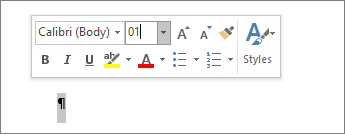
  3. Select inside the Font size box, type 01, and then press Enter .Setting font size to 1
  4. The paragraph now fits on the preceding page, removing the unwanted blank page.
  5. Press Ctrl+Shift+8 again to hide the paragraph marks (⌘+8 on a Mac).

If that paragraph still doesn’t fit on the preceding page, you can make the bottom margin smaller (Layout tab > Margins Custom Margins, and set the bottom margin to something small, like 0.3 inches).

Tip: If the paragraph mark has a square bullet next to it, the paragraph might have the Page break before option turned on. To turn it off, right-select the empty paragraph, select Paragraph Settings (Home tab), and on the Lines and Page Breaks tab of the dialog box, uncheck Page break before.

Word – Delete a page

Word for Microsoft 365 Word for Microsoft 365 for Mac Word 2021

To delete a page that contains text, graphics, or empty paragraphs, select the content to delete, and press Delete. You can also do this:

  1. Click or tap anywhere in the page you want to delete, press Ctrl+G.
  2. In the Enter page number box, type \page.
  3. Press Enter on your keyboard, and then select Close.
  4. Verify that a page of content is selected, and then press Delete on your keyboard.

To remove blank pages in the middle or at the end of your document, see Delete a blank page.

App Launch

Did You Know

You can launch apps on your on the “TaskBar” by pressing:

  • WIN + 1 (to Launch the first app on your “TaskBar”)
  • WIN +2 (to launch the second App on your “TaskBar“)
  • WIN + X (for additional apps)

Stay tuned for more tips.

Windows Explorer

Today again I had the top section of my windows explorer just disappeared and I was not able to close the program using the x at the top right section of the header.

I was able to recover it by resetting the screen resolution and magnification, then later I found this trick that seems to force a screen reset. I was able to move it to my second screen an there is was just fine, so as long as I did not move it back to the surface primary screen it was just dandy.

The Ctrl+Shift+Win+B key sequence will restart your graphics driver.

Microsoft VTS

Join the Microsoft Virtual Training series

Enhance your technical skills with interactive webinars for core customer technical scenarios.

Local training and events

Take advantage of the latest Canadian Microsoft training and events to help you develop your team’s talent.

Let’s get started

Find your role, select a product or solution and pick the learning path for your skill level to begin the recommended training for Microsoft products and solutions.

Trust Relationship

How to Fix the error: The trust relationship between this workstation and the primary domain failed

Re-establish trust through PowerShell

In this method, we will re-establish trust between the domain controller and client using PowerShell. You will need to log on using a local Administrator account.

PRO TIP: If the issue is with your computer or a laptop/notebook you should try using Restoro Repair which can scan the repositories and replace corrupt and missing files. This works in most cases, where the issue is originated due to a system corruption. You can download Restoro by Clicking Here

  1. Log on Windows 10 using local Administrator account
  2. Click on Start menu and type PowerShell
  3. Right click on PowerShell and choose Run as Administrator
  4. Press Yes to confirm running as Administrator
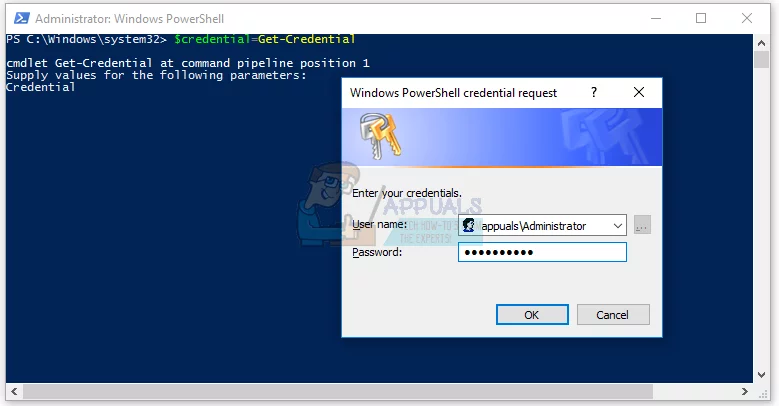
  5. Type $credential = Get-Credential and press Enter (add the domain credentials to the variable $credential)
  6. Enter domain admin account and password and then click OK
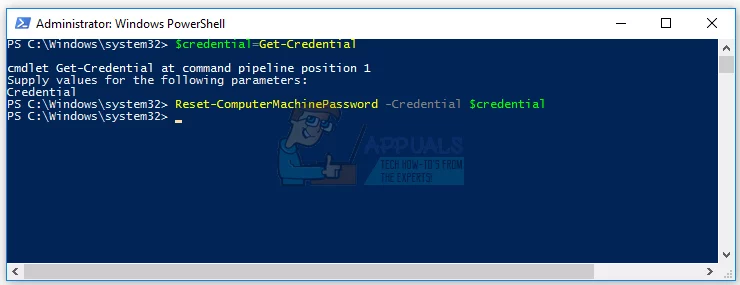
  7. Type Reset-ComputerMachinePassword -Credential $credential and press Enter (this uses the $credential variable to reset the account)
  8. Close PowerShell
  9. Restart your Windows machine
  10. Log on Windows 10 using domain user account

Windows AD Issues

Seizing the Operation Master Roles

Active Directory (AD) utilizes Flexible Single Master Operations (FSMO) roles to perform a specialized set of tasks on deployed Domain Controllers (DC).

Depending on the design, these roles could be located on different servers but in a single server all roles need to run from one DC. With a successful disaster recovery plan in place, one can easily recover said AD implementation as detailed in the information below.

Without a disaster recovery plans or running all roles from one DC, while not recommended, is sometimes unavoidable in some smaller sized businesses. The major concern with running all roles off one DC is that the roles cannot be migrated to another server should said server crash. The only way to migrate these roles is by seizing the operation master roles back to a working server.

The 5 Roles

  • Schema Master – one per forest
  • Domain Naming Master – one per forest
  • Relative ID (RID) Master – one per domain
  • Primary Domain Controller (PDC) Emulator – one per domain
  • Infrastructure Master – one per domain

To Seize: Step by Step

  1. Login to the domain controller as Domain Administrator
  2. Create and Administrative Command prompt
  3. Run Command ntdsutil
  4. Type Connections
  5. Type connect to server <FQDN of new role holder>
  6. Type Quit or Q

The seize command is used to seize a single role or all roles.

NOTE: After entering each seize command, a pop up window appears to confirm. Simply enter yes to continue.

seize schema master

Seize domain naming master

seize RID master

seize PDC

seize infrastructure master

When done Type quit to exit from ntdsutil. The operation master roles should now have been successfully seized to the specified server if no errors were generated.

msedgeCache

Microsoft Edge Cache

How to Hard Refresh and Reload a Page in Edge Under Windows 10?

Many time this happens when you are customizing a page and will not refresh and continues to use the cached page. In this case, the best thing to do is to refresh and reload the Page in the Edge Browser Cache.

The normal way to reload a page is to click on the page refresh icon at the top left of the browser next to the address bar. However if a page has a long “Time To Live” (TTL) the browser will reload the cached page and not fetch a new copy of the modified page.

To force Edge to clear the page from cache you must do a hard refresh by pressing the “Ctrl” key on the keyboard and then click on the refresh icon on the left side of the search bar.

How secure is your data

How Secure is your Data?

Data encryption security

USA has never allowed high tech encryption technologies to be exported unless approved by the US government.

Your question has to be! Why?

Could it be that, unless they can hack the product that it would/could cause a threat?

France does not allow encrypted emails, what more do we need to know about security, or the lack of it.

So how secure is your encrypted data?

Not at all secure, secure from the average hacker, but not secure from a professional, they have all of the secondary keys to decrypt the data.

We have Data and we have Encryption.

As a company, we have Data and it is always recommended that we use encryption to secure our data, but how secure is our data?

Hacking a broken padlock security issue.

My mind always reverts to the question, who invented the new encryption algorithm? Was it really an average person or does it originate at the DoD or one of the other 3 letter agencies, that are showing people a new highly secure environment, one that has backdoors to the plain text data.

Our life in IT security is an illusion, all it means is, that we have to teach awareness of the issues to our staff and prevent the small fry from tricking our users into parting out too much information, or clicking on links that could lead our company into a real security breach.