| Productive Azure has more than 100 services with great end-to-end tools to make you successful. Learn More | Hybrid Develop and deploy where you want, with the only consistent hybrid cloud on the market. Extend Azure on-premises with Azure Stack. Learn More |
| Intelligent Create intelligent apps using powerful data and AI services. Learn More | Trusted Join Startup’s, governments, and 95% of Fortune 500 businesses who run on the Microsoft Cloud today. Learn More |
Windows Defender
Windows Defender Offline has a powerful offline scanning tool that runs from a trusted environment, without starting your operating system. This topic describes how to use Windows Defender Offline in Windows 10, Windows 8.1, and Windows 7.
When should I use Windows Defender Offline?
Run Windows Defender Offline if:
- Windows Security (named Windows Defender Security Center in previous versions of Windows) detects rootkits or other highly persistent malware on your PC and alerts you to use Windows Defender Offline. You might see a message stating that malware was found on your device, or receive a message in Windows Security notifying you that additional cleaning is required.
- You suspect your PC might have malware that’s hiding on it, but your security software doesn’t detect anything. In this situation, you can start a Windows Defender Offline scan from Windows Security settings. Here’s how:
- Select Start , and then select Settings > Update & Security > Windows Security > Virus & threat protection .
- On the Virus & threat protection screen, do one of the following:
- In an up-to-date version of Windows 10: Under Current threats, select Scan options.
- In previous versions of Windows: Under Threat history, select Run a new advanced scan.
- Select Windows Defender Offline scan, and then select Scan now.
You’ll be prompted that you’re about to be signed out of Windows. After you are, your PC should restart. Windows Defender Offline will load and perform a quick scan of your PC in the recovery environment. When the scan has finished (after about 15 minutes), your PC will automatically restart to Windows. Notes
- Before you use Windows Defender Offline, make sure you save any open files and close all apps and programs.
- You typically need administrator rights on the PC on which you plan to run Windows Defender Offline.
- If you experience a Stop error on a blue screen when you run the offline scan, force a restart and try running a Windows Defender Offline scan again. If the blue-screen error happens again, contact Microsoft Support.
Where can I find scan results?
To see the Windows Defender Offline scan results:
- Select Start , and then select Settings > Update & Security > Windows Security > Virus & threat protection .
- On the Virus & threat protection screen, do one of the following:
- In an up-to-date version of Windows 10: Under Current threats, select Scan options, and then select Threat history.
- In previous versions of Windows: Select Threat history.
Windows Clipboard
Clipboard history gets a new look (Build 18305)
Have you already tried using clipboard history? If enabled, it allows you to save multiple clipboard items to use later. Introduced during RS5 development, we’ve been getting great feedback from everyone on this experience, and one of the things we heard most is that the UI wasn’t compact enough – a large space was used for each entry even if it was just a small text fragment. We originally opted to show bigger entries so there was space to show an image preview nicely, but when we looked at our data, we found 90% of items in the clipboard history were text. Based on that and your feedback, we now optimizing the design for text snippets – shrinking the height of each entry and thus giving you access to more entries without needing to scroll the view. Hope you like the change we made! Copy some text and press Windows logo key + V to check out the updated design.

Next-gen
Next-gen optical disk holds 10TB of data for 600 years
Scientists from Australia and China have used gold nanomaterials to demonstrate a new high-capacity optical disk able to hold data securely for more than 600 years, while using 1,000 times less power.
“All the data we’re generating in the Big Data era – over 2.5 quintillion bytes a day – has to be stored somewhere, but our current storage technologies were developed in different times,” said lead investigator, RMIT’s Distinguished Professor Min Gu. “While optical technology can expand capacity, the most advanced optical disks developed so far have only 50-year lifespans.
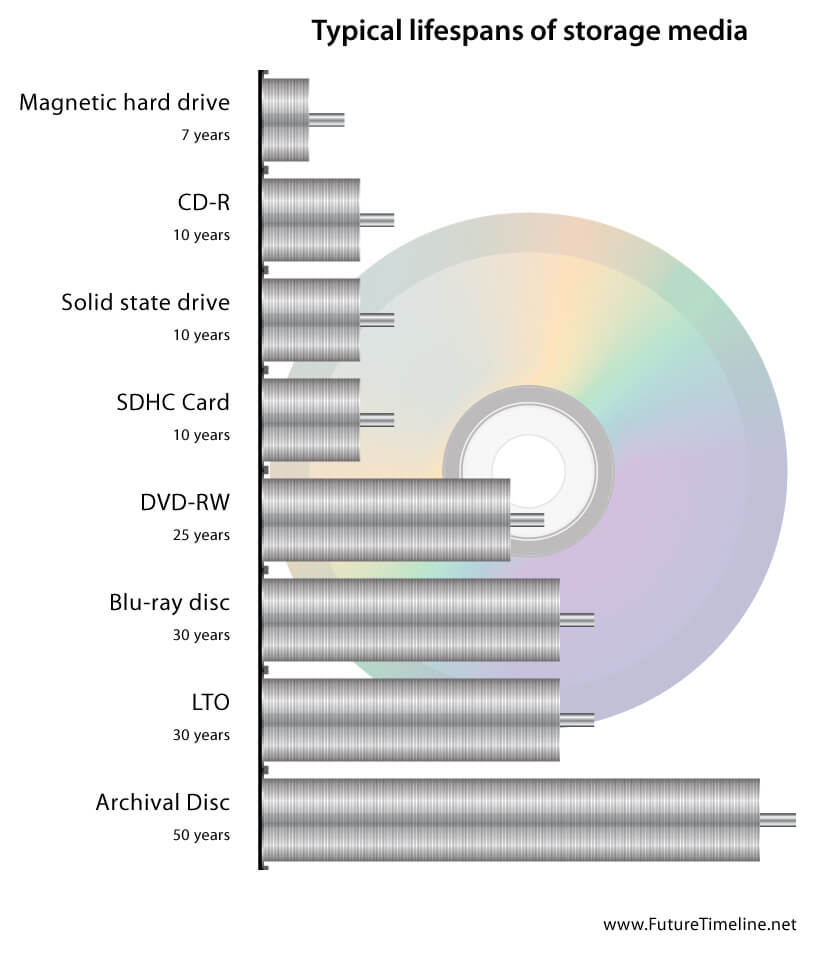
“Our technique can create an optical disk with the largest capacity of any optical technology developed to date, and our tests have shown it will last over half a millennium. While there is further work needed to optimise the technology – and we’re keen to partner with industrial collaborators to drive the research forward – we know this technique is suitable for mass production of optical disks, so the potential is staggering.”
The world is shifting from Big Data towards Long Data, which enables new insights to be discovered through the mining of massive datasets that capture changes in the real world over decades and centuries.
Excel 2016
MS Excel DLM |
 Excel Course Overview
Students who attend these courses will gain the knowledge, and skills with a confidence to create, format, enhance and print spreadsheets.
What You’ll Learn
Upon successful completion of this course, you will be able to create and develop Excel worksheets and workbooks in order to work with and analyze the data that is critical to the success of your organization. You will:
- Get started with Microsoft Office Excel.
- Perform calculations.
- Modify a worksheet.
- Format a worksheet.
- Print workbooks.
- Manage workbooks.
Enterprise security
Enterprise Security |

Security wheel
Enterprise security is not always a top priority or even on the mind of employees, but it should be. Educated employee’s are the first line of defense against security breaches. In large multinational companies their best defence strategy is to partner with their employees, prepare them with knowledge and empower them to live a secure lifestyle both at work and at home. The graphic shows some tips on how to keep our employees informed about good practices in security measures.
- The best way to protect against vulnerabilities at the enterprise level is to start by defining a plan that ensures security Education and Awareness is integrated into the business operational lifecycle as soon as possible.
- To ensure key security messages arrive effectively, think about how best to share these messages. For security-related alerts that require employee action you might consider an email as the appropriate method. For general awareness and reminders, digital signage around buildings and/or informal meetings may work better. One thing to bear in mind, have consistent branding around every communication.
- Informing employees of any new security policies or initiatives can help keep your security top of their mind. Have a clear objective of what you want your employees to learn and present the information in a way that is meaningful and memorable.
- Start an incentive program where employees that participate in your campaigns get recognized for their efforts. The more fun you have around security awareness and education, the more employees will automatically tune in to the topic.
- Cyber attacks will never stop targeting employees, so foster a workplace environment where employees feel comfortable sharing potential vulnerabilities they encounter without fear of reprisals.
- Empowering your employees to take charge of enterprise security within their own space lets them “practice security” on a daily basis, eventually becoming second nature to them.
- Add in a couple of worthwhile incentives, and you can have an army of security champions. Champions are a companies voices that help to influence employees and drive security awareness throughout the organization.
- Always measure your success or failures and learn from the results to see if the employees gained anything from your communications plan. Create feedback through social channels like the companies intranet portal any other channels that work. Using surveys to evaluate the success is just one way to achieve these results.
- Publish industry trends helps employees stay up to date with the latest attacks and can mitigate them. Employees need to know that not all organizations fall into the same category and what works in one organization may not work in another.
- Encouraging employees to share their experiences, stories and insights with family and friends will help create public awareness, thus helping to enable a more secure environment for everyone.
Remember that a Happy Employee is a valuable asset to any organization.
Internet of things
Internet of Things |
Are you ready for the new “Internet of Thing” (IoT)?
 The Internet of Things is the networking of all physical devices such as, your vehicle/s, any home appliances and other devices with electronics embedded, various software programs, sensors, actuators, and connectivity with enabled devices that connect to the Internet and can exchange data, creating opportunities for unlimited direct integration of our physical environment into a greater computer-based system or cloud based systems. This could increase efficiency in certain environments, economic benefits in others and reduced human intervention everywhere. Good or bad, this technology is spreading fast, people are looking for IoT developers (good as it creates jobs) and of course bad as we do not comprehend the full impact of what is to follow.
 The competition has started between Google Home and Amazon Echo has started and we will see great strides in the development of these two platforms. Both Amazon Echo and Home function as a source of entertainment, a personal assistant and a smart-home controller, but are listening to and monitoring your every word, a single word from you will get it started up and responding to your every command. They have voice recognition as the primary input method, starting music, a TV or any of the IoT devices connected within your home. With the latest IP V6 protocol that is being implemented to connect devices there will be approximately 4000 ip addresses available to each person on earth. Now that’s a lot of devices to connect.
MsProject
MS Project: Linking Tasks |
How do task links affect the schedule?
Task links (dependencies) show the relationship in time of one task to another. Linking tasks creates task dependencies. The long chain of tasks determines the entire length and end of a project. You have both Predecessors and Successors, ones that a task relies on and those task that rely on the current one.
Project management tip As you link tasks in a project, a path of links is set up. This path determines the end of your project. Some paths that you create are paths and some are the critical paths. A critical path is that path that when any task is delayed this will make the total project late.
Link type Description
Finish-to-start (FS) 
The dependent task (B) cannot begin until the task that it depends on (A) is complete.
For example, if you have two tasks, “Dig foundation” and “Pour concrete,” the “Pour concrete” task cannot begin until the “Dig foundation” task is completed.
When you link tasks in Project, the default link type is finish-to-start.
This link type is the default type. If you don’t specify a link type, the Finish-to-start relationship is assumed.
Start-to-start (SS)
The dependent task (B) cannot begin until the task that it depends on (A) begins.
The dependent task can start at any time after the task that it depends on begins. The SS link type does not require that both tasks begin at the same time.
For example, if you have two tasks, “Pour concrete” and “Level concrete,” the “Level concrete” task cannot begin until the “Pour concrete” task begins.
Finish-to-finish (FF)
The dependent task (B) cannot be completed until the task that it depends on (A) is completed.
The dependent task can be completed at any time after the task that it depends on is completed. The FF link type does not require that both tasks be completed at the same time.
For example, if you have two tasks, “Add wiring” and “add plumbing,” both must be completed at the same time before any inspection can be done.
Start-to-finish (SF)
The dependent task (B) cannot be completed until the task that it depends on (A) begins.
The dependent task can be completed at any time after the task that it depends on begins. The SF link type does not require that the dependent task be completed concurrent with the beginning of the task on which it depends.
This link type is rarely used in project management. An example would be roofing a home, and the two tasks: add roofing, supervise the work. In this case, the roofing can start, but the supervisor needs to show up at some point before the end of the roofing.
Online Fraud
Online Fraud |
Online fraud costs public billions but still not a police priority!
Why you ask, and so do I.
In this day and age, when everything is about profit one would think that it was worth investing in proper securities to protect not only their clients but also their profits.
- It seems that it is cheaper to insure than to protect (no losses incurred by the organization that has been a victim). Losses are carried by their clients, we pay the added cost of the insurance premiums.
- Bill Gates said many years ago that it was his vision to see a computer on everyone’s desk to make life easier, has that happened?
- Yes: we have a computer on most peoples desk, well in our hand now.
- No: it has not made life any easier, to the contrary it has made life more difficult and controlling.
- It has opened up a whole new arena for the criminal and no matter what you think that you can do about it, you are wrong. There will always be someone that creates something that is meant for the good of all and someone that will pull it apart and find the flaws and weaknesses to invade your privacy and steal from you.
“The overall cost of all forms of fraud in 2016 was £10bn to individuals and £144bn to the private sector, arising from almost 2m cyber-related fraud incidents”, just think of the cost of goods today compared to just a few years ago, do you really think that this could have been possible without our wonderfully connected world? I believe not.
Another factor that comes into play is the new currencies, digging for (mining) for crypto currencies, getting nothing and calling it the new currencies of the world. One ore two people are making millions and millions are loosing money in the process by actually purchasing this nothing with our last few coins that we have.Fraud it is everywhere, keep your eyes peeled and be on your guard.
And we thought that the old gangster day’s were bad, Open your eyes and look around people.
MS Project Best Practice
MS Project Best Practice |
Here are some Microsoft Project Best Practices to follow:
- Always place the Project Summary task at line 0 of your Gantt Chart Entry Table, instead of placing it on line 1. You will need to enable the display of the Project Summary Task via a checkbox on the Format Tab, Show/Hide Group.
- Link Tasks at the detail Task level rather than the Summary Task level.
- Use Automating Task Scheduling as soon as possible to take full advantage of Project’s automatic scheduling engine.
- Do not enter Dates for Start/Finish directly into the Entry Gantt Chart, let Project’s scheduling engine calculate them for you based on duration, linking, and resource availability.
- Enter resources in the Resource Sheet as soon as possible, you can then pick them from a menu on the Entry Gantt Chart or the Resource assignment, rather than entering them manually into the Entry Gantt Chart risking duplications or misspelled resources.
- Edit the Project Calendar to include all of the company’s working days (such as Monday through Friday) and non-working days (such as weekends and company holidays), and edit individual resource calendars for vacation time specific to a particular resource.
- On the Resource Sheet, use the Group column to enter in which department the resource belongs to assist with filtering and reporting.
- Baseline your project to track Planned vs. Actual values, then use interim baselines to track multiple baselines.
- Create custom filters, tables, views to report data to stakeholders in a custom formats that meet the needs of all stakeholders.
- Use the Organizer tool to copy these custom filters, tables, views, and reports between projects.